

Customizing your widget
Your widget should match your brand. From the Widget settings page, scroll down to configure your agent’s colors, icons, launcher style, interface type, and more. You can also add placeholder text and privacy policy links. Customers on a Business plan can disable Voiceflow branding.Choosing a modality
The widget supports two modalities: chat and voice. You can configure this in Widget → Modality & Interface → Modality. Chat modality is the default. Users type messages and see responses as text. This works well for most web use cases. With chat modality, you can optionally enable voice features:- Dictation allows users to input text using speech-to-text.
- Voice output lets users hear responses using the text-to-speech model configured in your project settings.
- Voice mode enables hands-free conversation. Once the user presses the voice button, they can speak naturally without pressing it again for each message.
Voice features consume credits. Learn more about credits.
Enabling file uploads
You can let users attach files to their messages so your agent can read and act on their contents. When a user uploads a file, Voiceflow extracts its contents using an LLM and keeps them available to your agent for the rest of the conversation, so the agent can answer questions about a document, summarize it, or use its details to complete a task. To turn file uploads on, open Widget → Modality & Interface and enable Allow file attachments. You can then set a Max files per conversation limit.Processing uploaded files consumes credits. Learn more about credits.
Supported files and limits
- Maximum file size: 5 MB per file.
- Supported formats: PDF, JPEG, JPG, PNG, and WEBP.
- Multiple files: users can attach more than one file in a single turn.
- Files per conversation: you must set a cap on the total number of files a user can upload across a conversation. The maximum (and default) is 10 files per conversation, and you can lower this limit.
How users upload files
Users attach files directly from the widget’s message input. Before sending, they can preview images in a lightbox, download them, or remove any file they added by mistake. If a user adds more files than your per-conversation limit allows, they can’t send their message until they remove enough files to fit within the cap.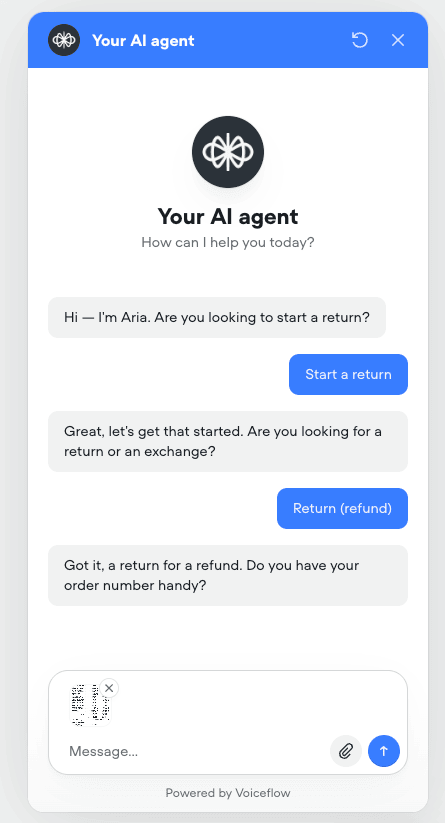
File storage and privacy
By default, uploaded files are stored in a private Voiceflow storage bucket and are never publicly accessible. Voiceflow reaches each file through a temporary, pre-signed URL that is authenticated against the user’s session. When a file appears in a transcript, access is authenticated based on whether the viewer can open that transcript. Uploaded files are deleted automatically when their associated transcript is deleted, so a file’s lifetime always matches its transcript.Bringing your own storage
The widget always stores uploaded files in Voiceflow’s secure storage bucket. At this time, using your own storage bucket is not supported directly in the widget. If your use case requires files to be stored outside of Voiceflow, you can build a custom integration using the API, which supports passing file URLs in your requests on the latest streaming and non-streaming interact endpoints. Send afile action with a URL Voiceflow can fetch for each file:
text field is optional. You can include multiple files in the files array. Voiceflow fetches each file from the URL you provide, extracts its contents, and makes them available to your agent for the rest of the conversation.
We recommend keeping files in private storage and passing short-lived, pre-signed GET URLs. That lets Voiceflow download the file only for the time needed to process it, without making the object permanently public.
When you bring your own storage, uploaded files are not shown in transcripts. Voiceflow does not store a lasting copy of the file, so it can’t reliably reopen the URL later.
Configuring security settings
Three Security options are available at the bottom of the widget settings page:- Approved domains restricts the widget to work only on specified websites.
- Legal disclaimer displays a message users must accept before chatting. Enable this if your company policy or local regulations require it.
- Chat transcript saving controls whether conversations are saved as transcripts. Disable this when processing sensitive information.
Publishing changes
Any changes to widget settings require you to publish a new version of your agent before they take effect in production.Developer customization
If you’re a developer, you can extend the widget’s functionality through the chat widget API, custom styling, and extensions. For most use cases, the built-in widget customization options in Widget settings are sufficient. But if you need more visual control, you can customize the widget’s appearance with your own CSS or by passing additional configuration options in thechat.load() function.
Using built-in styling options
You can control the widget’s appearance directly in yourchat.load() configuration using the assistant object. Here’s an example with the available styling parameters:
Visual & behavioural overrides
These override the remote publishing configuration fetched from the Voiceflow API. All fields are optional but local overrides take priority over remote settings.Widget Type
Header
Welcome banner
Agent avatar
Input
Launcher
Footer
Appearance
Position
AI disclaimer
Behavior
External additions
Color, Palette, and Spacing
color
Type: string (any valid CSS color parseable by chroma-js)
Default: #387dff
The primary brand color used throughout the widget (buttons, links, active states, header accents). The value is parsed by chroma-js, which supports multiple formats:
When
color is provided without a palette, the widget auto-generates a full 10-shade palette using HSL interpolation. The color value becomes shade 500 (the base), and lighter/darker shades are computed by varying the lightness.
Examples:
palette
Type: Object with 10 required shade keys (all hex strings)
Default: Auto-generated from color via HSL interpolation
A full color palette that gives you precise control over every shade the widget uses. If provided, this overrides the auto-generated palette entirely. All 10 shades are required.
Example - custom blue palette:
How auto-generation works: When onlycoloris provided,createPalette(color)extracts the hue (H) and saturation (S) from the color, then generates shades by varying lightness from 95% (shade 50) down to 5% (shade 900). The original color is used as-is for shade 500.
Tip: When providing bothcolorandpalette, make surepalette[500]matchescolorfor consistency. If they differ,palettetakes priority for rendering whilecoloris effectively ignored.
spacing
Type: { side?: string, bottom?: string }
Default: { side: '30', bottom: '30' } (30 pixels each)
Controls the position of the widget relative to the viewport edges. The value is a numeric string representing pixels The px unit is appended automatically. Only effective in overlay mode.
spacing.sideDistance from the left or right edge (determined by thesideproperty)spacing.bottomDistance from the bottom edge
Applying custom CSS
To go beyond the built-in options, you can write CSS rules that override the widget’s default styles. Chat widget elements use class names prefixed with.vfrc-.
For example, to change the background color of agent messages:
Supported CSS classes
Voiceflow provides a list of supported CSS classes that you can modify. While the widget has additional classes beyond those listed below, modifying them is at your own risk. Only the classes listed below are officially supported.View the full list of supported classes
View the full list of supported classes
Loading your stylesheet
Once you’ve written your CSS, you can pass it to the widget in two ways. Option 1: Link a hosted stylesheet Host your CSS file and provide the URL in theassistant.stylesheet property:
btoa() in your browser console to encode your CSS to base64.