

The PII redaction feature must be subscribed to by contacting our sales team.
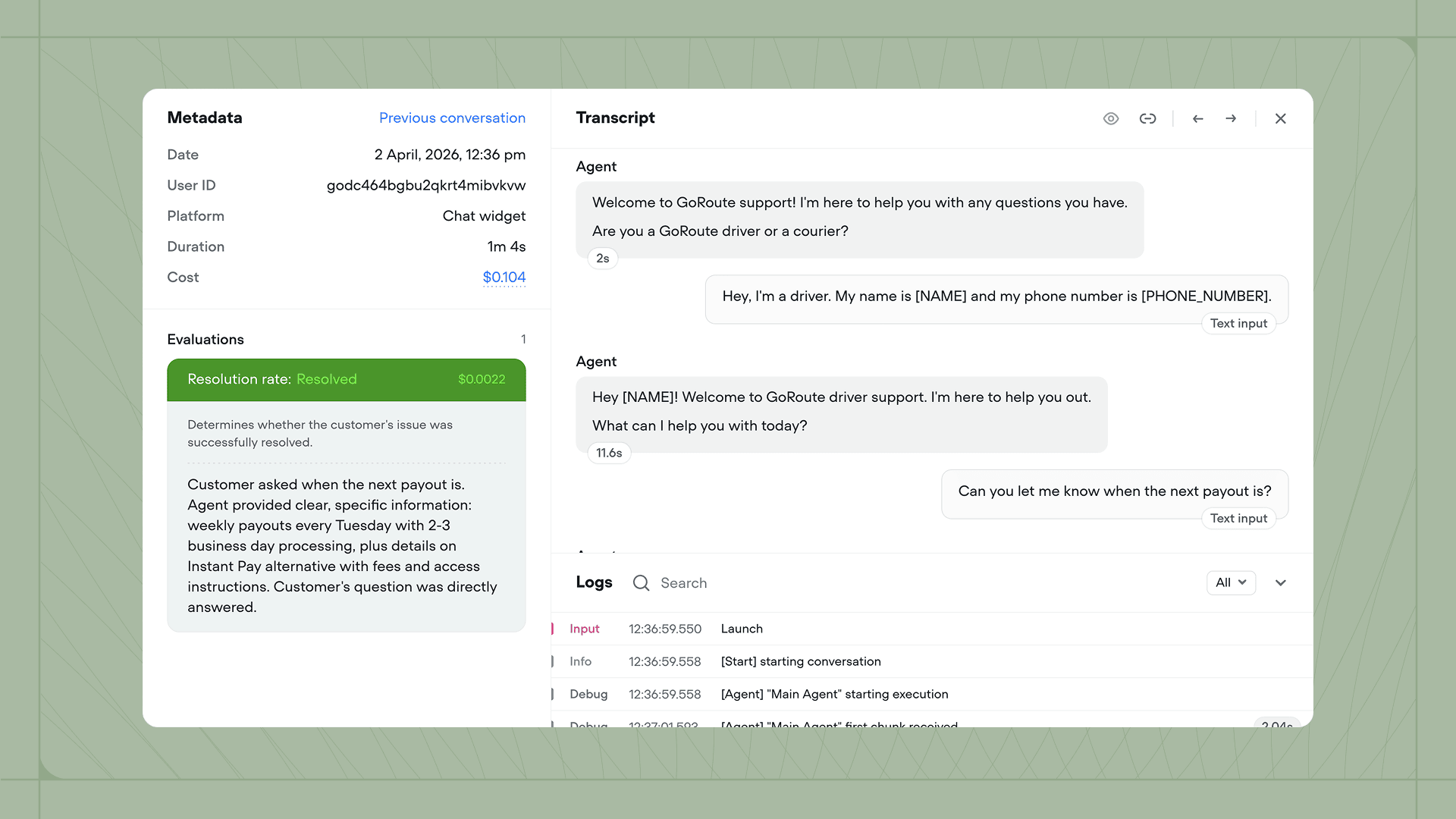
[NAME], [EMAIL_ADDRESS]) before transcripts are stored. Sensitive user information never persists in your conversation logs.
How it works
PII is detected using a machine learning model hosted within Voiceflow’s infrastructure. Your data is never sent to any third-party service during the redaction process. Key behaviours:- Production only. Redaction applies only to production conversations. Development and test conversations are not redacted, so you can debug freely.
- Not retroactive. Enabling redaction does not affect existing transcripts. Disabling it does not unredact previously redacted transcripts. Only future conversations are affected.
- Structure preserved. The overall structure of your traces and requests remains the same. Only the content of specific text properties is modified.
Enabling PII redaction
1
Subscribe to the PII redaction add-on
You can unlock the PII redaction feature by subscribing the applicable add-on. To do so, contact our sales team. If you’re on an enterprise plan, reach out to your account manager to have the feature enabled for your organization.
2
Enable PII redaction on your project
Open the project that you’d like to redact PII from. Then, head to Settings → Security and enable the PII redaction feature.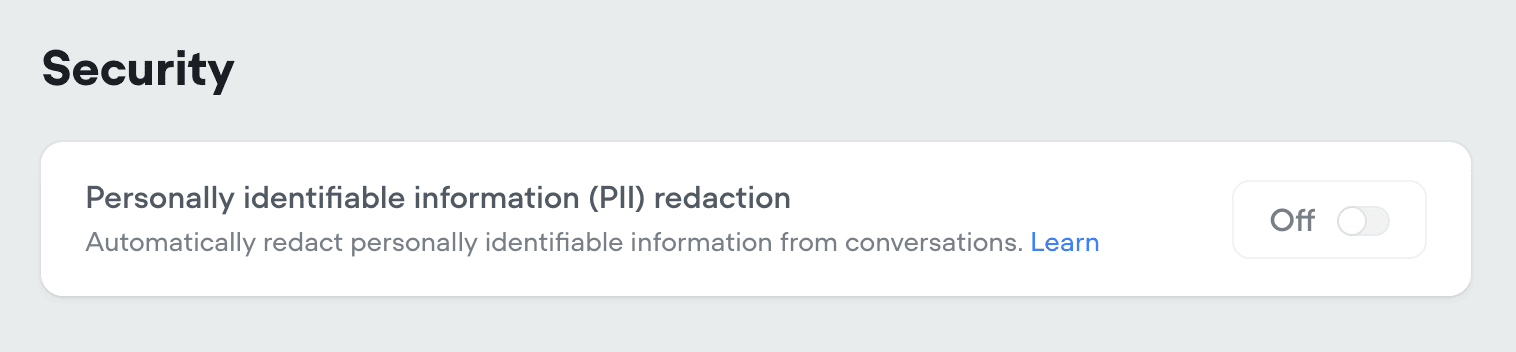
3
Repeat for other projects
PII redaction is a project-level setting. If you’d like to redact PII from multiple projects, enable it in Settings → Security on each individual project.
Viewing unredacted transcripts
After redaction is enabled, you can temporarily view the original unredacted version of a transcript using the toggle in the transcript detail view. This is intended for debugging purposes.Unredacted transcripts are only available for 48 hours after the conversation takes place. After that, the original data is permanently deleted and cannot be recovered.
What gets redacted
PII redaction scans both your agent’s responses (traces) and user inputs (requests), covering a wide range of PII types across different data structures.Detected PII types
The redaction system detects over 35 types of personally identifiable information:Protection methods
The system uses four approaches depending on the type of content:Trace data
Traces represent the messages and content your agent sends during a conversation, including text responses, cards, carousels, and media. PII redaction processes each trace type differently depending on the properties it contains.Text trace
Text trace
Modified properties:
payload.message: Censor redactionpayload.slate.content: Censor rich text redactionpayload.audio.src: Erase redaction
Before redaction
After redaction
Speak trace
Speak trace
Modified properties:
payload.message: Censor redactionpayload.src: Erase redaction
Before redaction
After redaction
CardV2 trace
CardV2 trace
Modified properties:
payload.title: Censor redactionpayload.description.text: Censor redactionpayload.description.slate: Censor rich text redactionpayload.imageUrl: Override redactionpayload.buttons[].name: Censor redactionpayload.buttons[].request.payload.label: Censor redaction
Before redaction
After redaction
Carousel trace
Carousel trace
Each card in the carousel is processed the same way as a CardV2 trace.Modified properties (per card):
payload.cards[].title: Censor redactionpayload.cards[].description.text: Censor redactionpayload.cards[].description.slate: Censor rich text redactionpayload.cards[].imageUrl: Override redactionpayload.cards[].buttons[].name: Censor redactionpayload.cards[].buttons[].request.payload.label: Censor redaction
Before redaction
After redaction
Choice trace
Choice trace
Modified properties:
payload.buttons[].name: Censor redactionpayload.buttons[].request.payload.label: Censor redaction
Before redaction
After redaction
Visual trace
Visual trace
Modified properties:
payload.image: Override redaction
Before redaction
After redaction
Request data
Requests represent user inputs sent to your agent, such as typed messages, button presses, and intent matches. These are redacted in the same way as traces to ensure PII is removed from both sides of the conversation.Text request
Text request
Modified properties:
payload: Censor redaction
Before redaction
After redaction
Intent request
Intent request
Modified properties:
payload.query: Censor redactionpayload.entities[].value: Censor redaction
Before redaction
After redaction
Path request
Path request
Modified properties:
payload.label: Censor redaction
Before redaction
After redaction
Message request
Message request
Modified properties:
payload.message: Censor redaction
Before redaction
After redaction
Action request
Action request
Modified properties:
payload.label: Censor redaction (if present)
Before redaction
After redaction
Debug traces
Debug traces contain technical information about your agent’s operation, such as model usage, latency metrics, and navigation data. These are handled differently from regular traces using an allowlist system. All properties inpayload.metadata are redacted by default unless explicitly allowlisted.
Full list of allowlisted properties
Full list of allowlisted properties
The following properties are preserved as-is and never redacted:
userID- User identifierversionID- Version identifiertools- Tool registration and agent step datamodel- AI model identifiersprovider- Service provider informationvoice- Voice configurationpostMultiplierTokensConsumption- Token consumption metricsvariant- Message variant informationcode- Execution codelatency- Performance timing metricsmaxTokens- Token limitsqueryTokens- Query token countsanswerTokens- Answer token countstemperature- AI temperature settingstokens- Token countsmultiplier- Token multipliersnextID- Navigation identifiersdiagramID- Diagram identifiersintent- Intent informationconfidence- Confidence scorestokensMultiplier- Token multiplier valuestokensConsumption- Token consumption datanodeID- Node identifiersresult- Result datastatus- Status informationtokenConsumption- Token consumption data
[Restricted due to potential PII]. This ensures new debug metadata properties are automatically protected until explicitly reviewed.
Redaction examples
These quick examples show how common types of PII appear in your transcript data before and after redaction is applied: Text content:- Before:
"Hello, I'm Sarah Johnson from Acme Corp" - After:
"Hello, I'm [NAME] from [ORGANIZATION]"
- Before:
"Call me at 555-123-4567 or email sarah@acme.com" - After:
"Call me at [PHONE_NUMBER] or email [EMAIL_ADDRESS]"
- Before:
"I live at 123 Main St, Boston, MA 02101" - After:
"I live at [LOCATION_ADDRESS], [LOCATION_CITY], [LOCATION_STATE] [LOCATION_ZIP]"
Limitations
There are a few things to keep in mind when using PII redaction. These limitations are by design to balance privacy protection with usability.- Development conversations are not redacted. Only production conversations are processed.
- Redaction is not retroactive. Enabling or disabling PII redaction only affects future conversations.
- Audio is erased entirely. Audio URLs are set to empty strings because audio content cannot be selectively edited to remove only PII.
- Images are replaced with a placeholder. All image URLs are overridden with a standard placeholder to prevent potential PII exposure through images.
- Detection is English only. The PII detection model analyzes text in English.