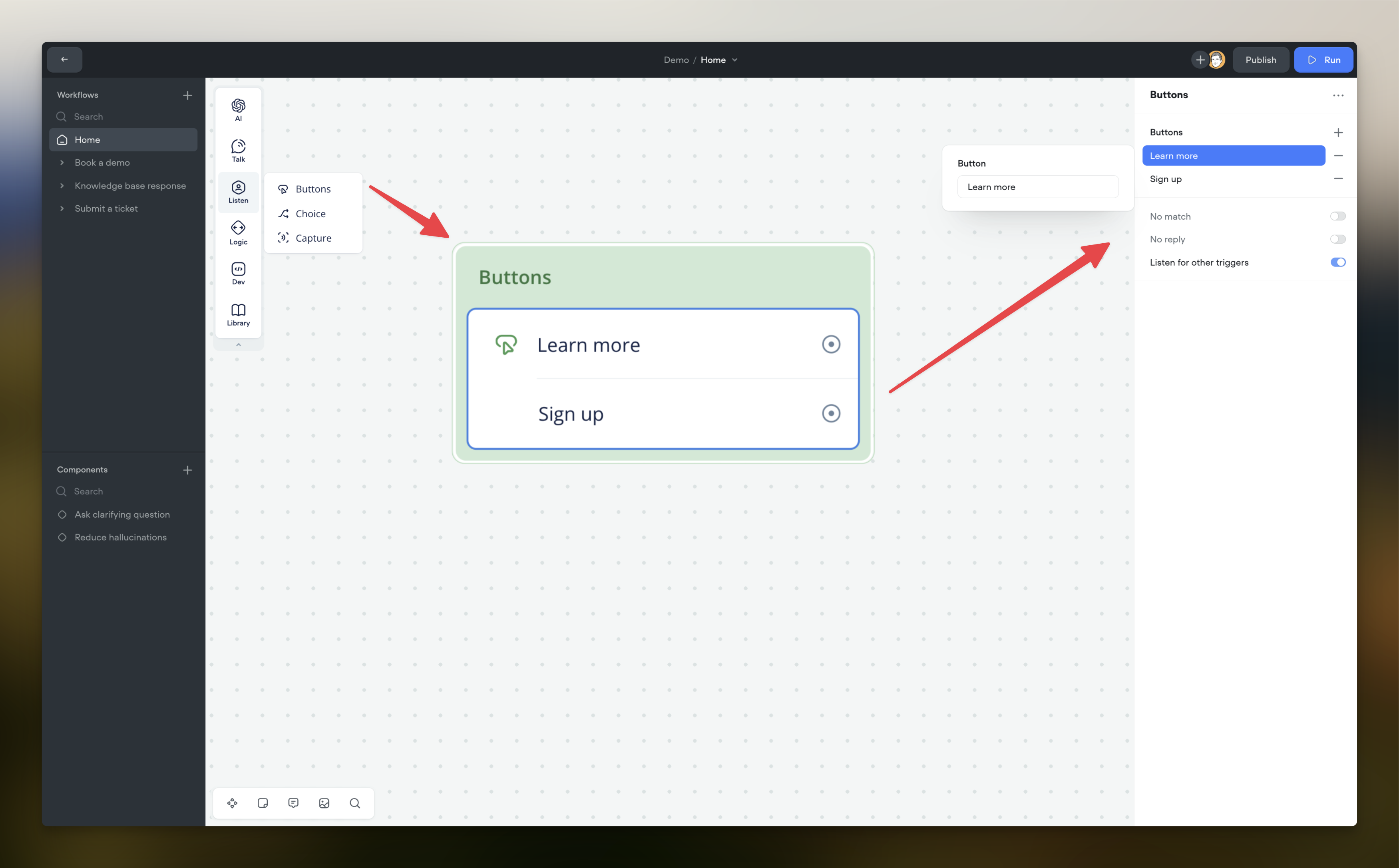
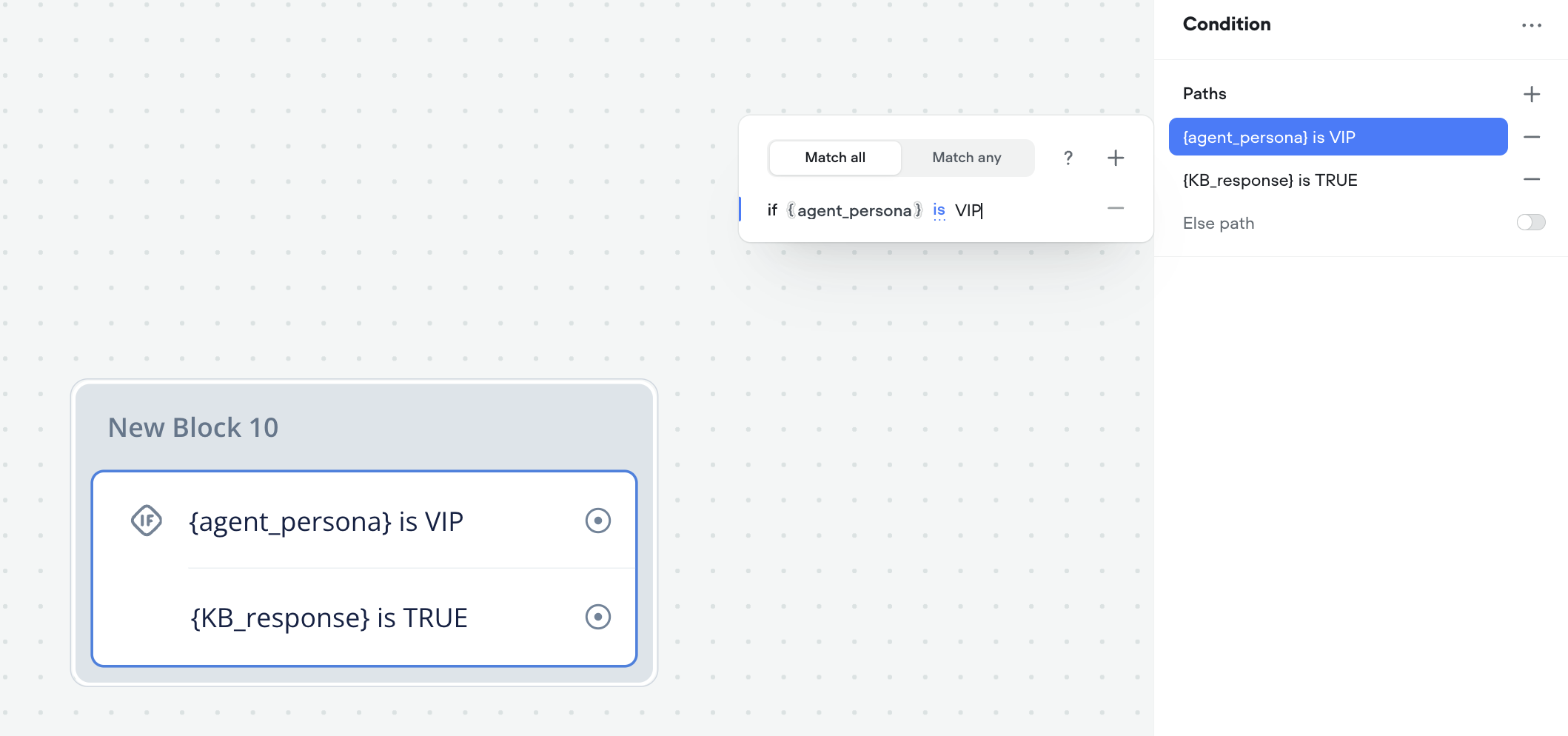
We are introducing a new version of the Condition step type to enhance condition handling in your AI agents.

Affected Property: diagrams[id].nodes

What's Changing:

  • A new condition-v3 node type with an updated data structure will be added for greater flexibility and expressiveness.

New Format Preview:

type CodeText = (string | { variableID: string } | { entityID: string })[];

interface MarkupSpan {
  text: Markup;
  attributes?: Record<string, unknown>;
}

type Markup = (string | { variableID: string } | { entityID: string } | MarkupSpan)[];

type ConditionV3Node = {
  type: "condition-v3";
  data: {
    portsV2: {
      byKey: Record<string, {
        type: string;
        id: string;
        target: string | null;
      }>;
    };
    condition: {
      type: "prompt";
    } | {
      type: "logic";
      items: {
        value: {
          type: "script";
          code: CodeText;
        } | {
          type: "value-variable";
          matchAll: boolean;
          assertions: {
            key: string;
            lhs: {
              variableID: string | null;
            };
            rhs: Markup;
            operation:
              | "is"
              | "is_not"
              | "greater_than"
              | "greater_or_equal"
              | "less_than"
              | "less_or_equal"
              | "contains"
              | "not_contains"
              | "starts_with"
              | "ends_with"
              | "is_empty"
              | "is_not_empty";
          }[];
        };
        id: string;
        label?: string | null;
      }[];
    };
    name?: string;
    noMatch?: {
      repromptID: string | null;
      path?: boolean | null;
      pathLabel?: string | null;
    } | null;
  };
  nodeID: string;
  coords?: [number, number];
};

What This Means for You:

  • The condition-v3 node will support both script-based and variable-based conditions, allowing for more complex logic.
  • Only new condition steps created after the update will utilize the condition-v3 format, unlocking additional features.

Action Required:

  • Plan to modify any custom integrations that interact with diagrams[id].nodes to accommodate the new node type.

We will provide more details and release notes when the update becomes available.


Improved Set Step

by Zoran Slamkov

We’re excited to announce an update to the Set step, making it more versatile and user-friendly for all Voiceflow users!

What’s New?

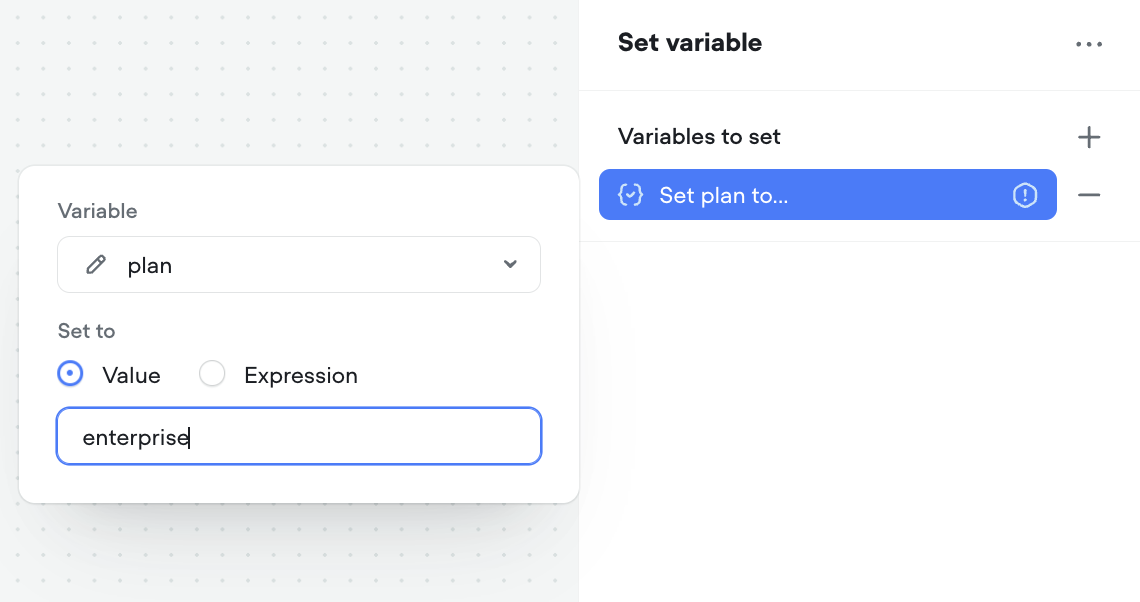
We’ve enhanced the Set step by splitting the traditional single input into two distinct options: Value and Expression. This change aims to streamline the user experience, providing a simpler path for non-technical users while offering more flexibility for advanced use cases.

  • Value Input: This new input option simplifies the process of setting variables. You can now directly assign values to variables without needing to worry about syntax like quotes or data types. This makes it easier than ever to quickly set variables to specific text (String) values or numbers.
  • Expression Input: For those needing more advanced functionality, the Expression input allows you to use JavaScript to set variables dynamically. Whether you’re incrementing or decrementing values, or performing complex calculations, the Expression input gives you the power to build sophisticated logic right within the Set step.

How to Use the Updated Set Step

To ensure a smooth transition to the new structure, all existing Set steps in your projects have been automatically migrated to the updated version. You’ll notice that your previous configurations now utilize the new Expression input, preserving all functionality while aligning with the updated structure.

Learn more about the new step in our step guides.

Thank you for being a part of our community, and happy agent building!

We are excited to announce the release of Messages, our latest feature designed to revolutionize how you manage, scale, and customize your AI agent's responses. At Voiceflow, our mission is to enable you to build scalable, efficient, and collaborative AI solutions, and Messages is a significant step forward in achieving that goal.


Effortless Reusability for Consistency and Efficiency
Messages enable you to reuse responses across different workflows, ensuring consistency and saving time. By typing a forward slash (/) in the message editor, you can quickly select from existing messages in the CMS. Any changes made to a reused message will propagate across all instances, streamlining updates and maintaining uniformity.

Dynamic Responses with Conditional Variants
With Messages, you can create multiple variants of a response to cater to diverse scenarios. Use AI to generate variants automatically or manually create them. Set conditions using the expression builder or JavaScript to tailor responses based on specific criteria, ensuring your agent's interactions are contextually appropriate and dynamic.

Enhanced Management with Improved Visibility
The Messages CMS provides a clear view of where each message is used, who last edited it, and when it was last updated. This enhanced visibility helps you manage your responses efficiently, track their usage across your projects, and ensure all team members are on the same page.

📘

The Messages feature is currently available exclusively for chat projects. We recognize the value this feature brings and are actively working on unifying our chat and voice project types. Our goal is to ensure that both modalities will soon benefit from the enhanced flexibility and efficiency that Messages provide.

What's Changed
With the release of Messages, we’ve made several notable improvements to enhance your experience:

  • Centralized Message Management: Manage all your responses from a single, unified interface.
  • Variants and Conditions: Create flexible message variants and set conditions for tailored responses.
  • Effortless Reusability: Easily reuse messages across workflows for consistency and efficiency.
  • Enhanced Visibility: Track where each message is used and manage updates efficiently.

We’re confident that Messages will significantly improve your AI agent design process, making it more efficient, scalable, and collaborative. Explore the new Messages feature today and experience the difference! Learn more about using Messages here.

Thank you for being a valued member of the Voiceflow community. We look forward to seeing how you leverage Messages to create exceptional AI experiences.

We're excited to announce that the default model for new projects in Voiceflow has been updated to Claude 3 - Haiku. This change reflects our commitment to providing the most advanced and effective tools for creating AI agents.

What’s New:

  • Claude 3 - Haiku is now the default model in all new Voiceflow projects, offering enhanced performance, improved language understanding, and more nuanced conversational abilities.

This update does not affect existing projects, but you can manually switch to Claude 3 - Haiku within your project settings if you wish to take advantage of the latest models.

Upcoming Changes to the Set Step Data Format

As part of our ongoing efforts to improve the functionality of Voiceflow, we are introducing an update to the Set step data format: the transition from setV2 to set-v3 nodes. This update provides a more refined structure to the Set step, offering improved control and flexibility for setting variables in your projects.


Key Changes

Transition toset-v3 Nodes:

We are transforming the current setV2 nodes into set-v3 nodes. This migration will ensure a more robust and flexible approach to variable management, with an updated structure that simplifies the process of setting variables within your projects.

Automatic Conversion:

All existing setV2 nodes will be automatically converted into set-v3 nodes when a project is opened in-app. This conversion preserves all existing functionalities while enabling you to leverage the new and improved system.


Technical Overview

The new set-v3 structure is outlined below:

Properties Affected:

  • Fields Added: None
  • Fields Modified: diagram.nodes[type=setV2] transformed into diagram.nodes[type=set-v3]
  • Fields Removed: None

Migration Example

To illustrate how the migration transforms setV2 nodes into set-v3 nodes, here are examples before and after the migration:

Before Migration:

{
  "diagram": {
    "nodes": {
      "642c35170660144e5e8e4042": {
        "type": "setV2",
        "data": {
          "name": "",
          "sets": [
            {
              "id": "random-id-1",
              "type": "advance",
              "variable": "set-variable1-id",
              "expression": "{{[variable1Name].variable1ID}}"
            },
            {
              "id": "random-id-2",
              "type": "advance",
              "label": "set-2-label",
              "variable": "set-variable2-id",
              "expression": "{{[variable1Name].variable1ID}} + {{[variable2Name].variable2ID}}"
            },
            {
              "id": "random-id-3",
              "type": "advance",
              "variable": "set-variable3-id",
              "expression": "\\"just text\\""
            }
          ],
          "title": "Overwrite Itinerary",
          "portsV2": {
            "byKey": {},
            "builtIn": {
              "next": {
                "type": "next",
                "target": null,
                "id": "642c35170660144e5e8e4043",
                "data": {
                  "points": [
                    {
                      "point": [171.50532091813443, 322.2586013515363],
                      "toTop": false,
                      "locked": false,
                      "reversed": false,
                      "allowedToTop": false
                    },
                    {
                      "point": [230.50532091813443, 322.2586013515363],
                      "toTop": false,
                      "locked": false,
                      "reversed": false,
                      "allowedToTop": false
                    },
                    {
                      "point": [230.50532091813443, 517.7585097988019],
                      "toTop": false,
                      "locked": false,
                      "reversed": false,
                      "allowedToTop": false
                    },
                    {
                      "point": [206.50532091813443, 517.7585097988019],
                      "toTop": false,
                      "locked": false,
                      "reversed": true,
                      "allowedToTop": false
                    }
                  ]
                }
              }
            },
            "dynamic": []
          }
        },
        "nodeID": "642c35170660144e5e8e4042"
      }
    }
  }
}

After Migration:

{
  "diagram": {
    "nodes": {
      "642c35170660144e5e8e4042": {
        "type": "set-v3",
        "data": {
          "name": "",
          "items": [
            {
              "id": "random-id-1",
              "type": "script",
              "value": [{ "variableID": "variable1ID" }],
              "variableID": "set-variable1-id"
            },
            {
              "id": "random-id-2",
              "type": "script",
              "label": "set-2-label",
              "value": [{ "variableID": "variable1ID" }, " + ", { "variableID": "variable2ID" }],
              "variableID": "set-variable2-id"
            },
            {
              "id": "random-id-3",
              "type": "script",
              "value": ["\\"just text\\""],
              "variableID": "set-variable3-id"
            }
          ],
          "label": "Overwrite Itinerary",
          "portsV2": {
            "byKey": {
              "next": {
                "type": "next",
                "target": null,
                "id": "642c35170660144e5e8e4043",
                "data": {
                  "points": [
                    {
                      "point": [171.50532091813443, 322.2586013515363],
                      "toTop": false,
                      "locked": false,
                      "reversed": false,
                      "allowedToTop": false
                    },
                    {
                      "point": [230.50532091813443, 322.2586013515363],
                      "toTop": false,
                      "locked": false,
                      "reversed": false,
                      "allowedToTop": false
                    },
                    {
                      "point": [230.50532091813443, 517.7585097988019],
                      "toTop": false,
                      "locked": false,
                      "reversed": false,
                      "allowedToTop": false
                    },
                    {
                      "point": [206.50532091813443, 517.7585097988019],
                      "toTop": false,
                      "locked": false,
                      "reversed": true,
                      "allowedToTop": false
                    }
                  ]
                }
              }
            },
            "builtIn": {},
            "dynamic": []
          }
        },
        "nodeID": "642c35170660144e5e8e4042"
      }
    }
  }
}

Next Steps

As we approach the release date for this migration, we encourage all users to familiarize themselves with these changes to make the most of the enhanced Set step functionality. If you have any questions or need assistance, our support team is ready to help. Stay tuned for the release!

Executing “untrusted” code is tricky. Bad actors can write malicious code and potentially access sensitive data.

The current way the javascript step is set up is a security risk and we want to move off of it at the earliest opportunity. Luckily there is a new backend that is both secure and more performant:
It's now 70-94% faster, there will be more information about that in another post.

All Javascript steps created after July 30th, 2024 already automatically use the new system. We’ll be slowly converting existing Javascript step to use the new system, with the cutoff by August 16, 2024.

The goal of the javascript step is to provide quick scripting to manipulate variables, rather than be a heavy-load serverless function with networking. For that, we can use functions.

No action is needed is on your end, unless you use the following patterns.

We've monitored all javascript step errors for the past week, running both the new and old backends in parallel, to categorize impact and effects.
For the select few users that are affected, we will be proactively reaching out to them.

All breaking changes we've observed will all be documented here, so people don't reimplement in the future.

Major breaking changes

requireFromUrl

The javascript step used to support requireFromUrl() which allows users to load in 3rd party libraries via URL. Commonly libraries such as moment or lodash and other utilities. This method is actually an anti pattern and has major security risks that the new backend does not support.

// example usage of requireFromUrl
const moment = requireFromUrl("https://cdnjs.cloudflare.com/ajax/libs/moment.js/2.29.1/moment.min.js");

time = moment().add(1, 'hours');

This will no longer work after the cutoff, the Javascript step will go down the fail port with a debug message saying: ReferenceError: fetch is not defined"

nodeJS modules: buffer

Our new backend does not run on NodeJS, but rather a v8 isolate.

Calls specific to NodeJS modules rather than the Javascript/ECMAScript standard will no longer be supported.

// example of using nodeJS modules
let buff = new Buffer(token, 'base64');
name = buff.toString('ascii');

This will no longer work after the cutoff, the Javascript step will go down the fail port with a debug message saying "ReferenceError: [module] is not defined".

There are low level alternatives to replicate the behavior of nodeJS utilities, and this is something LLMs excel at helping convert (be sure to test, of course!).

If you are using Buffer for base64 encoding/decoding, you can easily polyfill a atob or btoa function:

function atob(e){let r="";if((e=e.replace(/=+$/,"")).length%4==1)throw Error("Invalid base64 string");for(let t=0,n,a,o=0;a=e.charAt(o++);~a&&(n=t%4?64*n+a:a,t++%4)&&(r+=String.fromCharCode(255&n>>(-2*t&6))))a="ABCDEFGHIJKLMNOPQRSTUVWXYZabcdefghijklmnopqrstuvwxyz0123456789+/".indexOf(a);return r}
function btoa(t){let a="ABCDEFGHIJKLMNOPQRSTUVWXYZabcdefghijklmnopqrstuvwxyz0123456789+/",h="",r=0;for(;r<t.length;){let e=t.charCodeAt(r++),$=r<t.length?t.charCodeAt(r++):Number.NaN,c=r<t.length?t.charCodeAt(r++):Number.NaN;h+=a.charAt(e>>2&63),h+=a.charAt((e<<4|$>>4&15)&63),h+=isNaN($)?"=":a.charAt(($<<2|c>>6&3)&63),h+=isNaN(c)?"=":a.charAt(63&c)}return h}

// converts base64 to ascii, equivalent of Buffer.from(base64ref, 'base64')
atob(base64ref)

// converts ascii to base64
btoa("hello world")

JSON.stringify(this)

The this keyword now has a circular reference, and calling JSON.stringify(this) will result in recursion:

TypeError: Converting circular structure to JSON
--> starting at object with constructor 'global'
--- property 'global' closes the circle"

You can still use this.

Other minor changes

DateTimeFormat

Intl.DateTimeFormat() constructor. As per the MDN documentation:

If any of the date-time component options is specified, then dateStyle and timeStyle must be undefined.

so Date(A).toLocaleTimeString.(B, { timeZone, timeZoneName, timeStyle }) would crash.

fetch

The fetch() command already doesn't work today - we don't really support any await or async actions, but after the cutoff, the Javascript step will go down the fail port, with a debug message saying "ReferenceError: fetch is not defined".

resource changes

The new backend solution has the same timeout but will have a definited limit on CPU and memory.
In our monitoring no present blocks are affected by these limits.

Effective Date: October 30th, 2024

As AI agents continue to evolve, we have observed a significant shift towards building on Web chat and deploying on channels like WhatsApp, Slack, and Discord using our Dialog Manager API. To better align with this trend and allocate our resources effectively, we have decided to discontinue our direct hosting integration with Alexa.

Impact

  • Existing Alexa skills managed and deployed on Voiceflow will no longer function.
  • We strongly encourage you to migrate your skills directly to Alexa, as we will not be providing updates or support for our Alexa integration.

Support
We understand this transition may be challenging for some of our customers. Our team is here to support you during this period. If you have any questions or concerns, please reach out to us. Additionally, we have a growing Discord community with tutorials and community members ready to assist you.

Thank you for your understanding and continued support. We look forward to working with you to build amazing AI agents on our enhanced platform.

We are excited to announce the addition of GPT-4o mini to our platform. This integration brings new capabilities and improvements to enhance your AI agent experience. Below are the details of this update:

New Features:

  • GPT-4o mini Integration: Our platform now supports GPT-4o mini, providing exceptional cost-efficiency and speed. This compact model is perfect for many of your agent tasks.

Improvements:

  • Cost Efficiency: Enjoy significant cost savings with GPT-4o mini with a 0.2x token multiplier.
  • Faster Performance: Experience quicker response times, ensuring your AI agents perform efficiently.

We are committed to continuously improving our platform and providing you with the best tools available. Thank you for your continued support!

We are announcing the sunset of the FAQ API, effective August 6th, 2024. This decision is based on user feedback and our commitment to providing the best tools for your conversational AI needs. We believe that our new feature for uploading tabular data to the Knowledge Base is a more efficient and versatile solution for managing FAQs.

To help you transition smoothly, we have created a short video demonstrating how to use this new feature. You can watch the video below.

We appreciate your understanding and cooperation as we make this transition. Please reach out to our support team if you have any questions or need assistance.

We're proud to announce Voiceflow's newly revamped documentation. You can find it at docs.voiceflow.com.

This upgrade seeks to streamline all learning resources to help you use Voiceflow's designer tools as well as the APIs. Below are the details of this update:

  • Unified documentation: The old learn.voiceflow.com and developer.voiceflow.com sites have had all their articles merged into our new domain, docs.voiceflow.com. This is now the only site you'll need to visit to access all of Voiceflow's documentation. No more separate designer and developer documentation splits. Using the old domains will still redirect you to docs.voiceflow.com. Links inside the Voiceflow platform have also been updated.
  • New organization: We've reorganized our documentation into Building, Deploying, and Improving Agents, as well as new docs and guides for Getting Started and Improving agents.
  • Updated documentation: Many new articles have been written to teach you more about the state of the modern Voiceflow platform.
  • New API docs and guides: Our API docs have been restructured, with new conceptual articles added and a guide for Getting Started with APIs.
  • Moved changelogs: We've also brought over our changelogs from the old website (changelog.voiceflow.com). The link will still work to reach the changelogs.

You can learn more about our new docs in this video.

We are committed to continuously improving our resources and providing you with the best documentation available. Thank you for your continued support!