> ## Documentation Index
> Fetch the complete documentation index at: https://docs.voiceflow.com/llms.txt
> Use this file to discover all available pages before exploring further.
# Web chat extensions
> Customize the web chat widget to meet your needs.
Extensions let you add custom functionality to your web chat widget. You can render interactive elements like file uploads, date pickers, or payment forms directly in the chat window, or trigger effects elsewhere on your site like updating a status icon or running custom scripts.
## Extension types
There are two types of extensions:
**Response extensions** render interactive widgets inside the chat window. Use these for file uploads, calendar pickers, custom forms, or any UI element users interact with during the conversation.
**Effect extensions** don't render anything in the chat, but trigger actions elsewhere on your site. Use these for deep-linking users, updating page elements, or running custom scripts based on conversation events.
## How extensions work
Extensions are triggered by a [Function step](https://docs.voiceflow.com/docs/function-step) in a workflow. You define the extension in your site's JavaScript, then register it in your `chat.load()` configuration. The action name must match across your extension code and your Voiceflow steps.
### Response extension structure
```javascript theme={null}
const MyResponseExtension = {
name: 'ExtensionName',
type: 'response',
match: ({ trace }) => trace.type === 'Custom_Action_Name' || trace.payload?.name === 'Custom_Action_Name',
render: ({ trace, element }) => {
// Create and append your custom UI to 'element'
// Optionally return a cleanup function
}
};
```
### Effect extension structure
```javascript theme={null}
const MyEffectExtension = {
name: 'ExtensionName',
type: 'effect',
match: ({ trace }) => trace.type === 'Custom_Action_Name' || trace.payload?.name === 'Custom_Action_Name',
effect: ({ trace }) => {
// Run your custom logic here
}
};
```
### Registering extensions
Register your extensions in the `assistant.extensions` array when loading the widget:
```javascript theme={null}
window.voiceflow.chat.load({
verify: { projectID: 'YOUR_PROJECT_ID' },
url: 'https://general-runtime.voiceflow.com',
assistant: {
extensions: [MyResponseExtension, MyEffectExtension]
}
});
```
There's no limit to the number of extensions you can register.
# **Example: building a form extension**
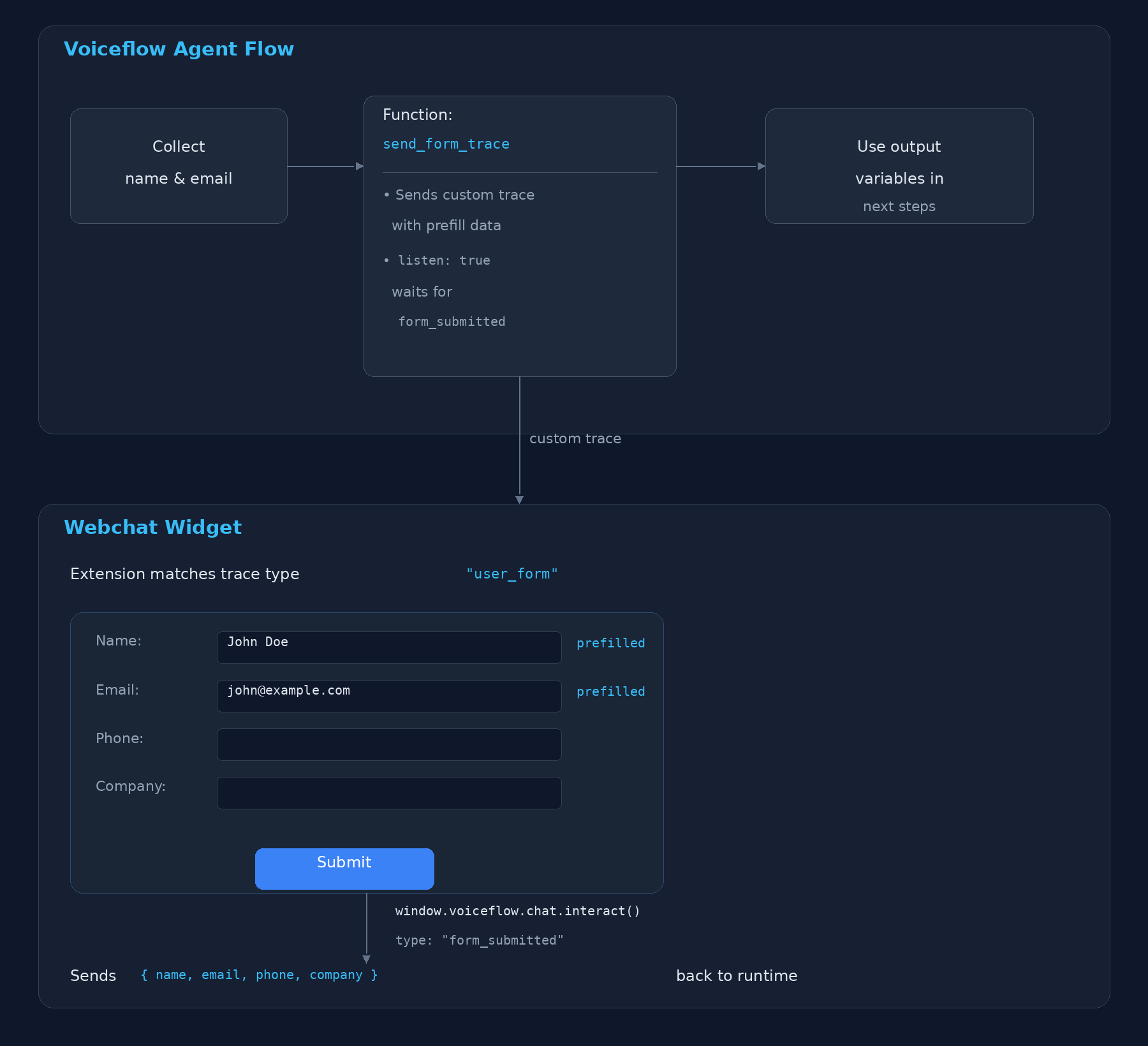
Build a webchat extension that renders a pre-filled form, triggered by a Voiceflow function. The function sends user data (name, email) via a custom trace, the extension renders the form and collects missing fields, and submits the completed data back to the function which routes based on the response.
## **Architecture**
 ## **Step 1: The Voiceflow Function**
Create a function in Voiceflow that accepts `name` and `email` as input variables, emits a custom trace to trigger the extension, and listens for the form submission.
### **Function Configuration**
| **Setting** | **Value** |
| :------------------- | :------------------------------------------------------ |
| **Name** | `Send Form Trace` |
| **Input Variables** | `name` (string), `email` (string) |
| **Output Variables** | `form_name`, `form_email`, `form_phone`, `form_company` |
| **Paths** | `submitted`, `default` |
### **Function Code**
```javascript theme={null}
export default async function main(args) {
const { name, email } = args.inputVars;
return {
trace: [
{
type: 'user_form',
payload: {
name: name || '',
email: email || '',
},
},
],
next: {
listen: true,
to: [
{
on: { 'event.type': 'form_submitted' },
dest: 'submitted',
},
],
defaultTo: 'default',
},
};
}
```
**What this does:**
1. Reads `name` and `email` from the function's input variables (collected earlier in the flow).
2. Emits a trace with `type: 'user_form'` — this is the custom trace type the webchat extension will match against.
3. Sets `listen: true` so the agent pauses and waits for the user to interact.
4. Routes to the `submitted` path when it receives an event with `type: 'form_submitted'`.
## **Step 2: The Webchat Extension**
Register a response extension that matches the `user_form` trace, renders a form pre-filled with the payload data, and sends the completed form back via `interact()`.
### **Extension Code**
```javascript theme={null}
const FORM_FIELDS = [
{ name: 'name', label: 'Name', type: 'text', prefilled: true },
{ name: 'email', label: 'Email', type: 'email', prefilled: true },
{ name: 'phone', label: 'Phone', type: 'tel', placeholder: '(555) 123-4567' },
{ name: 'company', label: 'Company', type: 'text', placeholder: 'Acme Inc.' },
];
const FORM_STYLES = `
.vf-form {
display: flex;
flex-direction: column;
gap: 12px;
padding: 16px;
font-family: sans-serif;
}
.vf-form label {
display: flex;
flex-direction: column;
gap: 4px;
font-size: 13px;
font-weight: 500;
color: #333;
}
.vf-form input {
padding: 8px 12px;
border: 1px solid #ddd;
border-radius: 6px;
font-size: 14px;
outline: none;
transition: border-color 0.15s;
}
.vf-form input:focus { border-color: #387dff; }
.vf-form input.error { border-color: #e74c3c; }
.vf-form button {
padding: 10px 16px;
background: #387dff;
color: #fff;
border: none;
border-radius: 6px;
font-size: 14px;
font-weight: 600;
cursor: pointer;
margin-top: 4px;
}
.vf-form button:hover { background: #2f68db; }
.vf-form button:disabled { background: #ccc; cursor: not-allowed; }
`;
function createFormField(field, prefillData) {
const label = document.createElement('label');
label.textContent = field.label;
const input = document.createElement('input');
input.type = field.type;
input.name = field.name;
input.required = true;
if (field.prefilled && prefillData[field.name]) {
input.value = prefillData[field.name];
}
if (field.placeholder) {
input.placeholder = field.placeholder;
}
label.appendChild(input);
return label;
}
const FormExtension = {
name: 'UserForm',
type: 'response',
match: ({ trace }) => trace.type === 'user_form' || trace.payload?.name == 'user_form',
render: ({ trace, element }) => {
const prefillData = trace.payload || {};
const style = document.createElement('style');
style.textContent = FORM_STYLES;
const form = document.createElement('form');
const container = document.createElement('div');
container.className = 'vf-form';
FORM_FIELDS.forEach((field) => {
container.appendChild(createFormField(field, prefillData));
});
const button = document.createElement('button');
button.type = 'submit';
button.textContent = 'Submit';
container.appendChild(button);
form.appendChild(style);
form.appendChild(container);
form.addEventListener('submit', (event) => {
event.preventDefault();
const data = {};
let valid = true;
FORM_FIELDS.forEach((field) => {
const input = form.querySelector(`input[name="${field.name}"]`);
const value = input.value.trim();
input.classList.toggle('error', !value);
if (!value) valid = false;
data[field.name] = value;
});
if (!valid) return;
button.disabled = true;
form.querySelectorAll('input').forEach((input) => {
input.disabled = true;
});
window.voiceflow.chat.interact({
type: 'form_submitted',
payload: data,
});
});
element.appendChild(form);
},
};
```
### **Register the Extension**
Add it to your `chat.load()` call:
```javascript theme={null}
window.voiceflow.chat.load({
verify: { projectID: 'YOUR_PROJECT_ID' },
url: 'https://general-runtime.voiceflow.com',
assistant: {
extensions: [FormExtension],
},
});
```
***
## **Step 3: Capture the Data in the Agent Flow**
When the user submits the form, `interact()` sends an event with `type: 'form_submitted'` and a payload containing `{ name, email, phone, company }`. The function's `listen` picks this up and routes to the `submitted` path.
To access the submitted data downstream, use a **Code** step (or a second function) connected to the `submitted` path:
```javascript theme={null}
// In a Code step after the "submitted" path
const name = last_event.payload.name;
const email = last_event.payload.email;
const phone = last_event.payload.phone;
const company = last_event.payload.company;
```
Alternatively, if using the function's **output variables**, create a second function on the `submitted` path that reads `last_event` and maps values to output variables:
```javascript theme={null}
export default async function main(args) {
const { last_event } = args.inputVars;
return {
outputVars: {
form_name: last_event.payload.name,
form_email: last_event.payload.email,
form_phone: last_event.payload.phone,
form_company: last_event.payload.company,
},
next: { path: 'success' },
};
}
```
***
## **Step 4: Wire the Agent Flow**
The overall canvas layout:
1. Before the function, collect `name` and `email`.
2. Wire those variables into the function's input variables.
3. Connect the `submitted` output path to a Code step or a Function that reads `last_event.payload`.
4. Use the extracted variables in subsequent steps or back in your agent.
***
## **Complete Working Example**
Two files: `form.js` with the extension, and `index.html` that loads it.
### `form.js`
```javascript theme={null}
const FORM_FIELDS = [
{ name: "name", label: "Name", type: "text", prefilled: true },
{ name: "email", label: "Email", type: "email", prefilled: true },
{ name: "phone", label: "Phone", type: "tel", placeholder: "(555) 123-4567" },
{ name: "company", label: "Company", type: "text", placeholder: "Acme Inc." },
];
const FORM_CSS = [
".vf-form { display:flex; flex-direction:column; gap:12px; padding:16px; font-family:sans-serif; }",
".vf-form label { display:flex; flex-direction:column; gap:4px; font-size:13px; font-weight:500; color:#333; }",
".vf-form input { padding:8px 12px; border:1px solid #ddd; border-radius:6px; font-size:14px; outline:none; transition:border-color 0.15s; }",
".vf-form input:focus { border-color:#387dff; }",
".vf-form input.error { border-color:#e74c3c; }",
".vf-form button { padding:10px 16px; background:#387dff; color:#fff; border:none; border-radius:6px; font-size:14px; font-weight:600; cursor:pointer; margin-top:4px; }",
".vf-form button:hover { background:#2f68db; }",
".vf-form button:disabled { background:#ccc; cursor:not-allowed; }",
].join("\n");
function createFormField(field, prefillData) {
const label = document.createElement("label");
label.textContent = field.label;
const input = document.createElement("input");
input.type = field.type;
input.name = field.name;
input.required = true;
if (field.prefilled && prefillData[field.name]) {
input.value = prefillData[field.name];
}
if (field.placeholder) {
input.placeholder = field.placeholder;
}
label.appendChild(input);
return label;
}
const FormExtension = {
name: "UserForm",
type: "response",
match: function (ctx) {
return ctx.trace.type === "user_form";
},
render: function (ctx) {
const prefillData = ctx.trace.payload || {};
const style = document.createElement("style");
style.textContent = FORM_CSS;
const form = document.createElement("form");
const container = document.createElement("div");
container.className = "vf-form";
FORM_FIELDS.forEach(function (field) {
container.appendChild(createFormField(field, prefillData));
});
const button = document.createElement("button");
button.type = "submit";
button.textContent = "Submit";
container.appendChild(button);
form.appendChild(style);
form.appendChild(container);
form.addEventListener("submit", function (event) {
event.preventDefault();
const data = {};
let valid = true;
FORM_FIELDS.forEach(function (field) {
const input = form.querySelector('input[name="' + field.name + '"]');
const value = input.value.trim();
input.classList.toggle("error", !value);
if (!value) valid = false;
data[field.name] = value;
});
if (!valid) return;
button.disabled = true;
form.querySelectorAll("input").forEach(function (input) {
input.disabled = true;
});
window.voiceflow.chat.interact({
type: "form_submitted",
payload: data,
});
});
ctx.element.appendChild(form);
},
};
```
### `index.html`
```javascript theme={null}
Form Extension Demo
## **Step 1: The Voiceflow Function**
Create a function in Voiceflow that accepts `name` and `email` as input variables, emits a custom trace to trigger the extension, and listens for the form submission.
### **Function Configuration**
| **Setting** | **Value** |
| :------------------- | :------------------------------------------------------ |
| **Name** | `Send Form Trace` |
| **Input Variables** | `name` (string), `email` (string) |
| **Output Variables** | `form_name`, `form_email`, `form_phone`, `form_company` |
| **Paths** | `submitted`, `default` |
### **Function Code**
```javascript theme={null}
export default async function main(args) {
const { name, email } = args.inputVars;
return {
trace: [
{
type: 'user_form',
payload: {
name: name || '',
email: email || '',
},
},
],
next: {
listen: true,
to: [
{
on: { 'event.type': 'form_submitted' },
dest: 'submitted',
},
],
defaultTo: 'default',
},
};
}
```
**What this does:**
1. Reads `name` and `email` from the function's input variables (collected earlier in the flow).
2. Emits a trace with `type: 'user_form'` — this is the custom trace type the webchat extension will match against.
3. Sets `listen: true` so the agent pauses and waits for the user to interact.
4. Routes to the `submitted` path when it receives an event with `type: 'form_submitted'`.
## **Step 2: The Webchat Extension**
Register a response extension that matches the `user_form` trace, renders a form pre-filled with the payload data, and sends the completed form back via `interact()`.
### **Extension Code**
```javascript theme={null}
const FORM_FIELDS = [
{ name: 'name', label: 'Name', type: 'text', prefilled: true },
{ name: 'email', label: 'Email', type: 'email', prefilled: true },
{ name: 'phone', label: 'Phone', type: 'tel', placeholder: '(555) 123-4567' },
{ name: 'company', label: 'Company', type: 'text', placeholder: 'Acme Inc.' },
];
const FORM_STYLES = `
.vf-form {
display: flex;
flex-direction: column;
gap: 12px;
padding: 16px;
font-family: sans-serif;
}
.vf-form label {
display: flex;
flex-direction: column;
gap: 4px;
font-size: 13px;
font-weight: 500;
color: #333;
}
.vf-form input {
padding: 8px 12px;
border: 1px solid #ddd;
border-radius: 6px;
font-size: 14px;
outline: none;
transition: border-color 0.15s;
}
.vf-form input:focus { border-color: #387dff; }
.vf-form input.error { border-color: #e74c3c; }
.vf-form button {
padding: 10px 16px;
background: #387dff;
color: #fff;
border: none;
border-radius: 6px;
font-size: 14px;
font-weight: 600;
cursor: pointer;
margin-top: 4px;
}
.vf-form button:hover { background: #2f68db; }
.vf-form button:disabled { background: #ccc; cursor: not-allowed; }
`;
function createFormField(field, prefillData) {
const label = document.createElement('label');
label.textContent = field.label;
const input = document.createElement('input');
input.type = field.type;
input.name = field.name;
input.required = true;
if (field.prefilled && prefillData[field.name]) {
input.value = prefillData[field.name];
}
if (field.placeholder) {
input.placeholder = field.placeholder;
}
label.appendChild(input);
return label;
}
const FormExtension = {
name: 'UserForm',
type: 'response',
match: ({ trace }) => trace.type === 'user_form' || trace.payload?.name == 'user_form',
render: ({ trace, element }) => {
const prefillData = trace.payload || {};
const style = document.createElement('style');
style.textContent = FORM_STYLES;
const form = document.createElement('form');
const container = document.createElement('div');
container.className = 'vf-form';
FORM_FIELDS.forEach((field) => {
container.appendChild(createFormField(field, prefillData));
});
const button = document.createElement('button');
button.type = 'submit';
button.textContent = 'Submit';
container.appendChild(button);
form.appendChild(style);
form.appendChild(container);
form.addEventListener('submit', (event) => {
event.preventDefault();
const data = {};
let valid = true;
FORM_FIELDS.forEach((field) => {
const input = form.querySelector(`input[name="${field.name}"]`);
const value = input.value.trim();
input.classList.toggle('error', !value);
if (!value) valid = false;
data[field.name] = value;
});
if (!valid) return;
button.disabled = true;
form.querySelectorAll('input').forEach((input) => {
input.disabled = true;
});
window.voiceflow.chat.interact({
type: 'form_submitted',
payload: data,
});
});
element.appendChild(form);
},
};
```
### **Register the Extension**
Add it to your `chat.load()` call:
```javascript theme={null}
window.voiceflow.chat.load({
verify: { projectID: 'YOUR_PROJECT_ID' },
url: 'https://general-runtime.voiceflow.com',
assistant: {
extensions: [FormExtension],
},
});
```
***
## **Step 3: Capture the Data in the Agent Flow**
When the user submits the form, `interact()` sends an event with `type: 'form_submitted'` and a payload containing `{ name, email, phone, company }`. The function's `listen` picks this up and routes to the `submitted` path.
To access the submitted data downstream, use a **Code** step (or a second function) connected to the `submitted` path:
```javascript theme={null}
// In a Code step after the "submitted" path
const name = last_event.payload.name;
const email = last_event.payload.email;
const phone = last_event.payload.phone;
const company = last_event.payload.company;
```
Alternatively, if using the function's **output variables**, create a second function on the `submitted` path that reads `last_event` and maps values to output variables:
```javascript theme={null}
export default async function main(args) {
const { last_event } = args.inputVars;
return {
outputVars: {
form_name: last_event.payload.name,
form_email: last_event.payload.email,
form_phone: last_event.payload.phone,
form_company: last_event.payload.company,
},
next: { path: 'success' },
};
}
```
***
## **Step 4: Wire the Agent Flow**
The overall canvas layout:
1. Before the function, collect `name` and `email`.
2. Wire those variables into the function's input variables.
3. Connect the `submitted` output path to a Code step or a Function that reads `last_event.payload`.
4. Use the extracted variables in subsequent steps or back in your agent.
***
## **Complete Working Example**
Two files: `form.js` with the extension, and `index.html` that loads it.
### `form.js`
```javascript theme={null}
const FORM_FIELDS = [
{ name: "name", label: "Name", type: "text", prefilled: true },
{ name: "email", label: "Email", type: "email", prefilled: true },
{ name: "phone", label: "Phone", type: "tel", placeholder: "(555) 123-4567" },
{ name: "company", label: "Company", type: "text", placeholder: "Acme Inc." },
];
const FORM_CSS = [
".vf-form { display:flex; flex-direction:column; gap:12px; padding:16px; font-family:sans-serif; }",
".vf-form label { display:flex; flex-direction:column; gap:4px; font-size:13px; font-weight:500; color:#333; }",
".vf-form input { padding:8px 12px; border:1px solid #ddd; border-radius:6px; font-size:14px; outline:none; transition:border-color 0.15s; }",
".vf-form input:focus { border-color:#387dff; }",
".vf-form input.error { border-color:#e74c3c; }",
".vf-form button { padding:10px 16px; background:#387dff; color:#fff; border:none; border-radius:6px; font-size:14px; font-weight:600; cursor:pointer; margin-top:4px; }",
".vf-form button:hover { background:#2f68db; }",
".vf-form button:disabled { background:#ccc; cursor:not-allowed; }",
].join("\n");
function createFormField(field, prefillData) {
const label = document.createElement("label");
label.textContent = field.label;
const input = document.createElement("input");
input.type = field.type;
input.name = field.name;
input.required = true;
if (field.prefilled && prefillData[field.name]) {
input.value = prefillData[field.name];
}
if (field.placeholder) {
input.placeholder = field.placeholder;
}
label.appendChild(input);
return label;
}
const FormExtension = {
name: "UserForm",
type: "response",
match: function (ctx) {
return ctx.trace.type === "user_form";
},
render: function (ctx) {
const prefillData = ctx.trace.payload || {};
const style = document.createElement("style");
style.textContent = FORM_CSS;
const form = document.createElement("form");
const container = document.createElement("div");
container.className = "vf-form";
FORM_FIELDS.forEach(function (field) {
container.appendChild(createFormField(field, prefillData));
});
const button = document.createElement("button");
button.type = "submit";
button.textContent = "Submit";
container.appendChild(button);
form.appendChild(style);
form.appendChild(container);
form.addEventListener("submit", function (event) {
event.preventDefault();
const data = {};
let valid = true;
FORM_FIELDS.forEach(function (field) {
const input = form.querySelector('input[name="' + field.name + '"]');
const value = input.value.trim();
input.classList.toggle("error", !value);
if (!value) valid = false;
data[field.name] = value;
});
if (!valid) return;
button.disabled = true;
form.querySelectorAll("input").forEach(function (input) {
input.disabled = true;
});
window.voiceflow.chat.interact({
type: "form_submitted",
payload: data,
});
});
ctx.element.appendChild(form);
},
};
```
### `index.html`
```javascript theme={null}
Form Extension Demo
Form Extension Demo
```
***
## **How the Data Flows**
| **Step** | **Where** | **What Happens** |
| :------- | :--------- | :------------------------------------------------------------------------------- |
| 1 | Agent flow | Name and email collected into variables |
| 2 | Function | Emits `user_form` trace with `{ name, email }` payload; sets `listen: true` |
| 3 | Webchat | Extension matches trace, renders form pre-filled with name and email |
| 4 | Webchat | User fills in phone and company, clicks Submit |
| 5 | Webchat | `interact({ type: 'form_submitted', payload: { name, email, phone, company } })` |
| 6 | Function | `listen` receives `form_submitted` event, routes to `submitted` path |
| 7 | Agent flow | Code step or Function reads `last_event.payload` to populate variables |
***
## **Key Concepts**
### ****`Why listen: true?`****
Setting `listen: true` in the function's `next` command pauses the agent at the function step. Without it, the agent would immediately continue down the `defaultTo` path before the user has a chance to fill out the form.
### **Event Matching**
The `to` array uses MongoDB-style queries (via sift.js) to match incoming events. `{ 'event.type': 'form_submitted' }` matches any `interact()` call where `type` equals `'form_submitted'`. You can also match on payload properties:
```javascript theme={null}
to: [
{
on: {
'event.type': 'form_submitted',
'event.payload.company': { $exists: true },
},
dest: 'submitted',
},
]
```
### **Accessing Submitted Data**
After the listen resolves, the event that triggered it is available as `last_event` in downstream Code steps:
```javascript theme={null}
// last_event structure
{
type: 'form_submitted',
payload: {
name: 'John Doe',
email: 'john@example.com',
phone: '(555) 123-4567',
company: 'Acme Inc.',
},
}
```
### **Extension Cleanup**
The `render` function can return a cleanup function that runs when the message is removed from the chat (e.g., on session reset):
```javascript theme={null}
render: ({ trace, element }) => {
const form = buildForm(trace.payload);
element.appendChild(form);
return () => {
form.remove();
};
},
```
## More examples
For additional extension examples including video embeds, maps, input field controls, and confetti animations, visit the [sample extensions repository](https://github.com/voiceflow-gallagan/vf-extensions-demo)
## Example: building a form extension
This example walks through creating a form that collects name, email, and phone number from users.
### Step 1: Create the extension
Add this script above your web chat widget snippet, before the closing ` ` tag:
```javascript theme={null}