> ## Documentation Index
> Fetch the complete documentation index at: https://docs.voiceflow.com/llms.txt
> Use this file to discover all available pages before exploring further.
# Instructions
> Defines how the agent routes requests and decides which tools to use
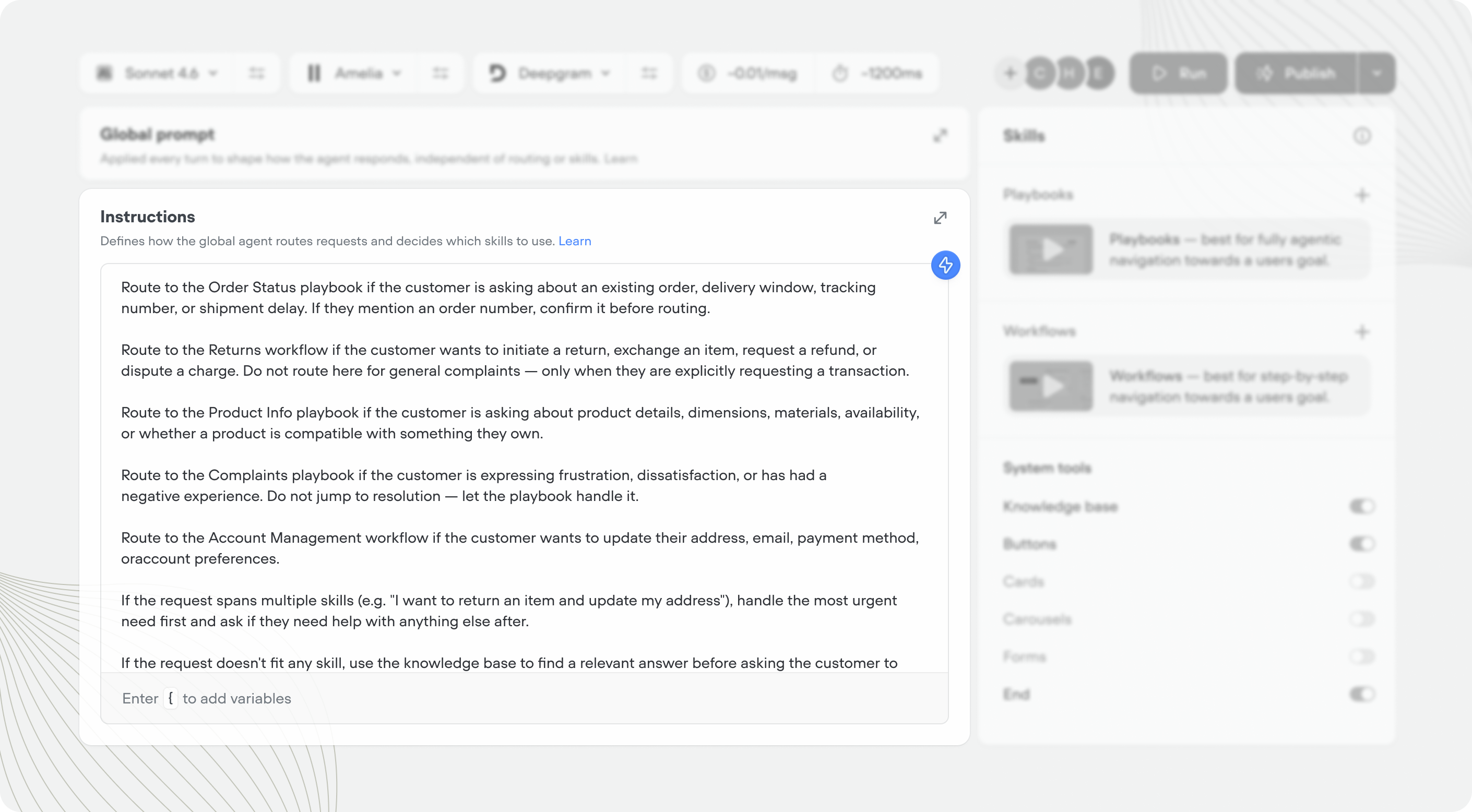 ## What are agent instructions?
Instructions are the decision-making layer of your agent. Where the global prompt defines *how* your agent behaves, instructions define *when* it does things.
When a user message comes in, the agent reads its instructions and picks the most appropriate way to handle it. Instructions are written in plain language, not code.
| Layer | What it controls | When it applies |
| ----------------- | ----------------------------- | ---------------------------------- |
| **Global prompt** | Personality, tone, guardrails | Every agentic turn, always |
| **Instructions** | Routing, tool selection | When deciding what to do next |
| **Playbook** | Goal-specific behavior | When a specific playbook is active |
## Writing agent instructions
Instructions work best when they're clear about which tool handles which type of request. Think of it like a brief for a team — each member needs to know what they own.
Every playbook, workflow, and tool has a name and a trigger. You can layer supporting context on top in the agent instructions, or playbook instructions.
* **Name** — what it is. Short and literal.
* **Trigger** — what it does *and* when the AI agent should use it. This is the primary signal the agent reads when deciding whether to call a tool or route into a playbook.
* **Instructions** — any additional context, routing reminders, phrasing rules, or ordering that apply on top of the trigger.
| | Good | Bad |
| ---------------- | -------------------------------------------------------------------------------------------------------------------------------------------------- | --------------------------- |
| **Name** | Order Status | Handle order related things |
| **Trigger** | Looks up the status of an existing order by order ID or email. Use when the customer asks about an existing order, a delivery, or tracking info. | Helps customers with orders |
| **Instructions** | Route to Order Status for any order-related question. If the customer then wants to return or exchange the item, hand off to the Returns workflow. | N/A |
## What are agent instructions?
Instructions are the decision-making layer of your agent. Where the global prompt defines *how* your agent behaves, instructions define *when* it does things.
When a user message comes in, the agent reads its instructions and picks the most appropriate way to handle it. Instructions are written in plain language, not code.
| Layer | What it controls | When it applies |
| ----------------- | ----------------------------- | ---------------------------------- |
| **Global prompt** | Personality, tone, guardrails | Every agentic turn, always |
| **Instructions** | Routing, tool selection | When deciding what to do next |
| **Playbook** | Goal-specific behavior | When a specific playbook is active |
## Writing agent instructions
Instructions work best when they're clear about which tool handles which type of request. Think of it like a brief for a team — each member needs to know what they own.
Every playbook, workflow, and tool has a name and a trigger. You can layer supporting context on top in the agent instructions, or playbook instructions.
* **Name** — what it is. Short and literal.
* **Trigger** — what it does *and* when the AI agent should use it. This is the primary signal the agent reads when deciding whether to call a tool or route into a playbook.
* **Instructions** — any additional context, routing reminders, phrasing rules, or ordering that apply on top of the trigger.
| | Good | Bad |
| ---------------- | -------------------------------------------------------------------------------------------------------------------------------------------------- | --------------------------- |
| **Name** | Order Status | Handle order related things |
| **Trigger** | Looks up the status of an existing order by order ID or email. Use when the customer asks about an existing order, a delivery, or tracking info. | Helps customers with orders |
| **Instructions** | Route to Order Status for any order-related question. If the customer then wants to return or exchange the item, hand off to the Returns workflow. | N/A |
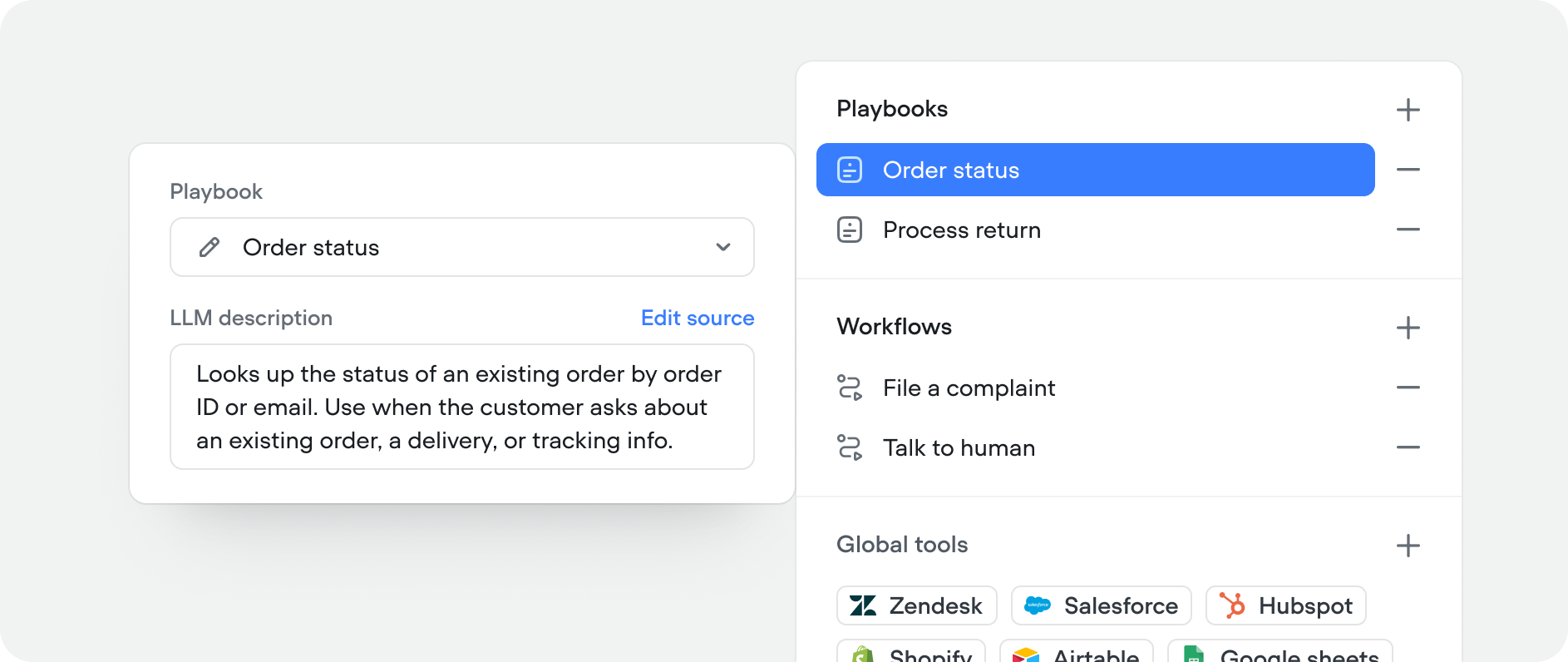 We recommend putting both the *what* and the *when* in the trigger. Agent instructions are only in context when the agent is routing at the top level — once a playbook is active, only the global prompt and that playbook's own instructions are visible. If a playbook needs to jump to another playbook or decide which tool to call, it reads the names and descriptions. Any "when to use this" guidance that lives only in agent instructions won't reach those decisions. The instructions field is still useful for routing reinforcement and supporting context; it just shouldn't be the only place the "when" lives:
```text Simple agent insturctions example theme={null}
# Routing
Route to the Order Status playbook if the customer is asking
about an existing order, delivery, or tracking information.
Route to the Returns workflow if the customer wants to return,
exchange, or get a refund on a product.
Route to the Product Info playbook if the customer is asking
about product details, availability, or compatibility.
If the customer's request doesn't fit any tool, let them
know what you can help with and ask them to rephrase, or use the knowledge
base to provide accurate information.
```
### Adding a start message
If you want to define an agentic start message in your agent, you can add it to agent instructions.
```text theme={null}
# Starting Message
Greet the user and offer assitance, use buttons to show the user
quick options of what they can do.
# Tools
```
We recommend putting both the *what* and the *when* in the trigger. Agent instructions are only in context when the agent is routing at the top level — once a playbook is active, only the global prompt and that playbook's own instructions are visible. If a playbook needs to jump to another playbook or decide which tool to call, it reads the names and descriptions. Any "when to use this" guidance that lives only in agent instructions won't reach those decisions. The instructions field is still useful for routing reinforcement and supporting context; it just shouldn't be the only place the "when" lives:
```text Simple agent insturctions example theme={null}
# Routing
Route to the Order Status playbook if the customer is asking
about an existing order, delivery, or tracking information.
Route to the Returns workflow if the customer wants to return,
exchange, or get a refund on a product.
Route to the Product Info playbook if the customer is asking
about product details, availability, or compatibility.
If the customer's request doesn't fit any tool, let them
know what you can help with and ask them to rephrase, or use the knowledge
base to provide accurate information.
```
### Adding a start message
If you want to define an agentic start message in your agent, you can add it to agent instructions.
```text theme={null}
# Starting Message
Greet the user and offer assitance, use buttons to show the user
quick options of what they can do.
# Tools
```
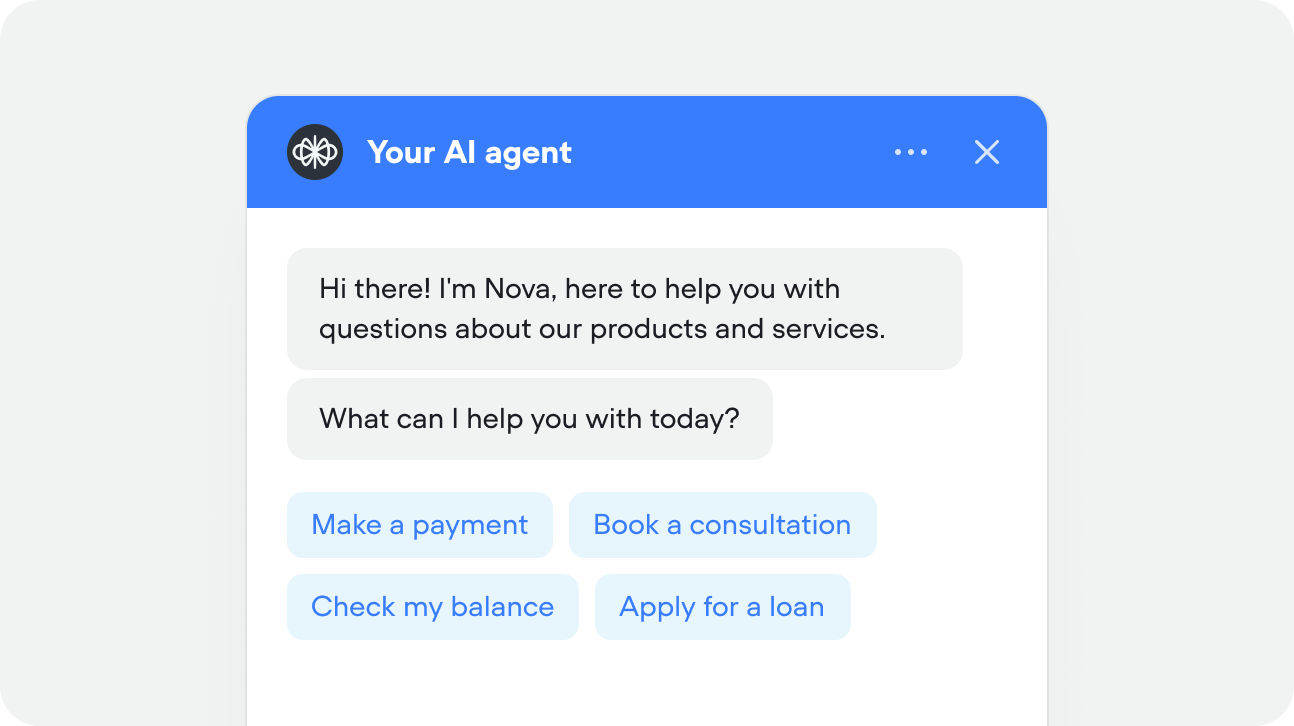 The above instruction would result in something like the chat above. The agent has followed the instructions and greeted the user, while also using the buttons tool to deliver dynamic options based on tools available.
If you want to deliver a very specific start message, you can instruct your agent to do so, or use the [initialization workflow](/documentation/build/framework/initialization-workflow) to design something truly deterministic with a [message step](/documentation/build/steps/message).
## Testing instructions
From the agent tab, press 'Run' in the top right, or use the shortcut Shift + R
Type or talk to your agent from the message input
Check logs the logs section and state viewer to see if your agent is routing correctly
The above instruction would result in something like the chat above. The agent has followed the instructions and greeted the user, while also using the buttons tool to deliver dynamic options based on tools available.
If you want to deliver a very specific start message, you can instruct your agent to do so, or use the [initialization workflow](/documentation/build/framework/initialization-workflow) to design something truly deterministic with a [message step](/documentation/build/steps/message).
## Testing instructions
From the agent tab, press 'Run' in the top right, or use the shortcut Shift + R
Type or talk to your agent from the message input
Check logs the logs section and state viewer to see if your agent is routing correctly
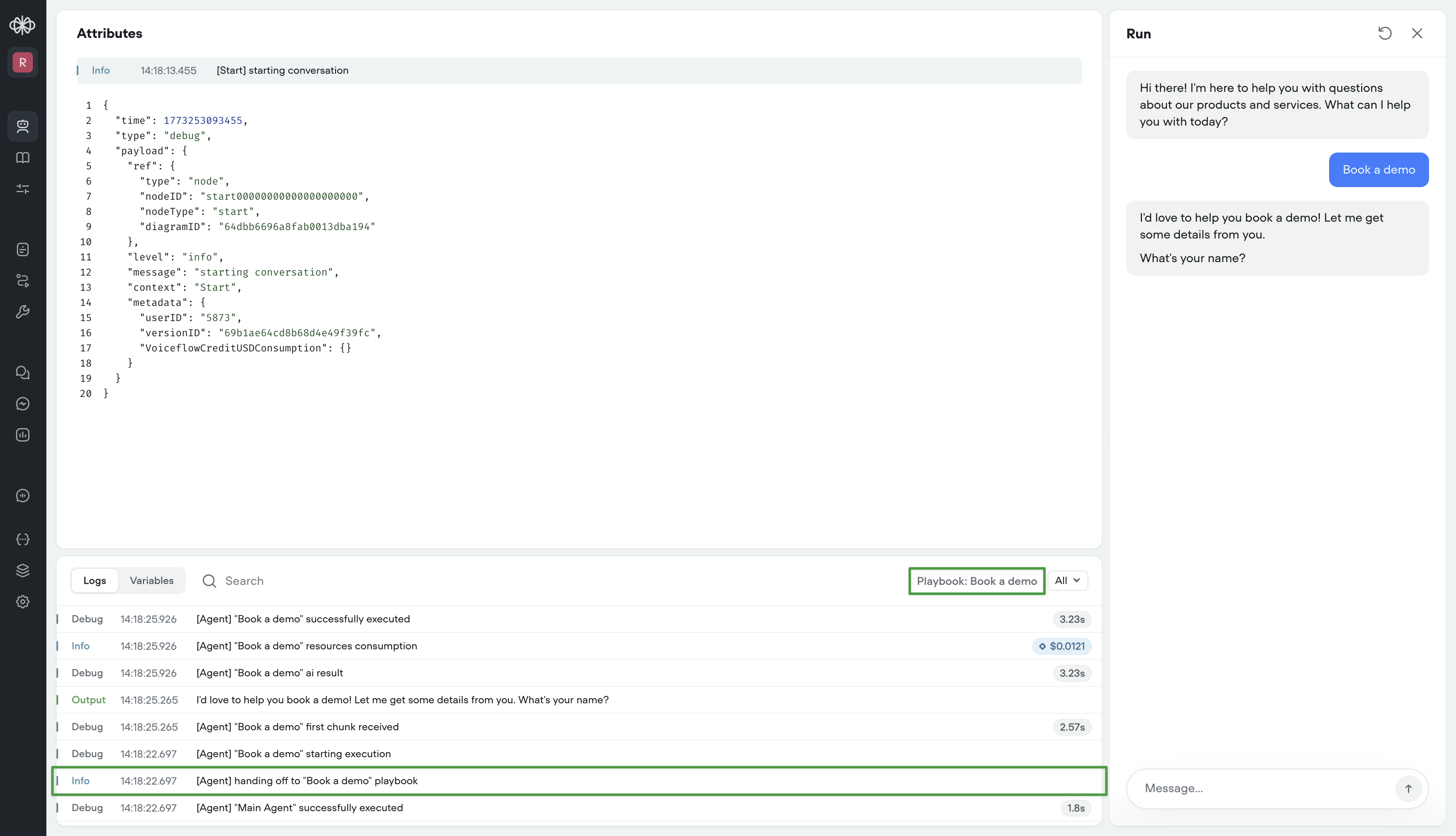 If your agent doesn't route make sure you're following best practices for tool name and trigger. From there, try improving the instructions for that tool.