> ## Documentation Index
> Fetch the complete documentation index at: https://docs.voiceflow.com/llms.txt
> Use this file to discover all available pages before exploring further.
# Session lifecycle webhook
> Send events when your conversations start and end to external systems.
The session lifecycle webhook notifies your systems in real time whenever a conversation starts or ends, letting you run automations around each conversation without polling for changes.
A common use is running automations once a conversation ends, without adding latency to the conversation itself. For example, you can sync conversation data to your CRM, kick off a downstream workflow in your own systems, or notify another service that a conversation has wrapped up. Because this work runs on your side in response to the webhook, none of it slows down the live conversation.
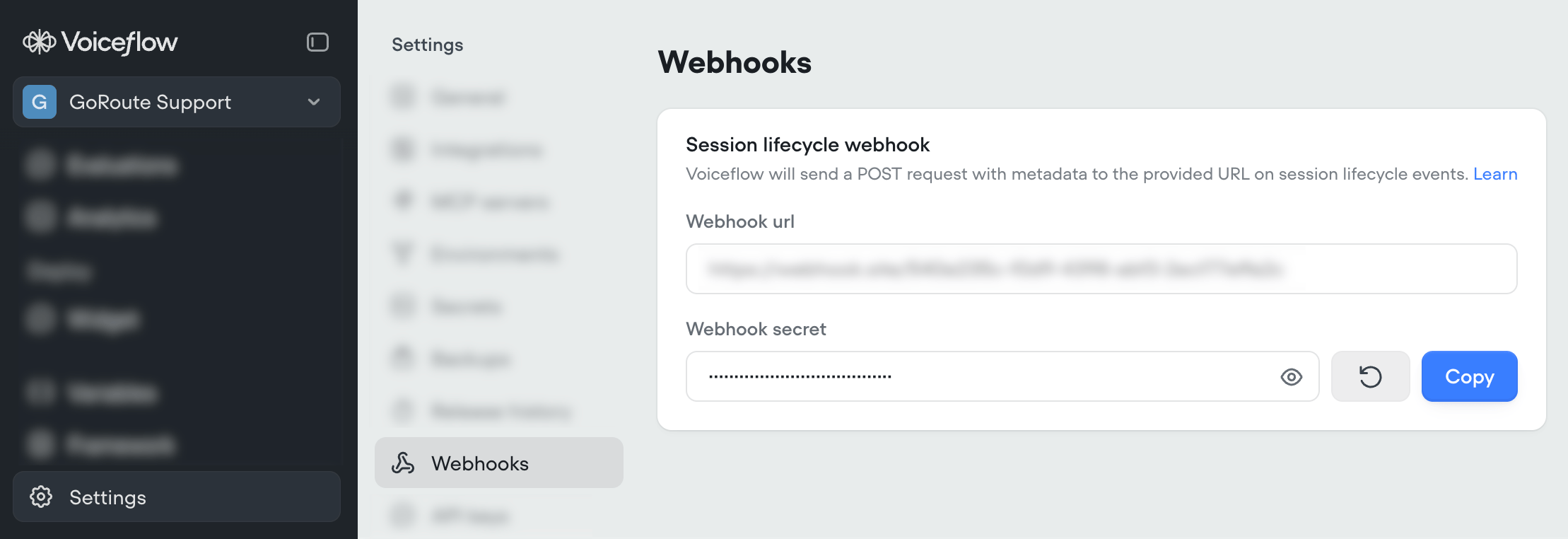
Add your webhook URL to your project under **Settings → Webhooks**.
 ## Events
Voiceflow will send POST requests to your webhook URL on the following events.
| Human-readable name | Name | Category |
| ------------------- | ------------------------------------------------- | --------------------------------- |
| Session started | [`runtime.session.start`](#runtime-session-start) | [Session events](#session-events) |
| Session ended | [`runtime.session.end`](#runtime-session-end) | [Session events](#session-events) |
| Call started | [`runtime.call.start`](#runtime-call-start) | [Call events](#call-events) |
| Call ended | [`runtime.call.end`](#runtime-call-end) | [Call events](#call-events) |
## Session events
Session events fire whenever a conversation starts or ends, across all projects and channels. These are the events most integrations listen for.
### `runtime.session.start`
This event is sent when a new session is started for a user.
```typescript theme={null}
{
"type": "runtime.session.start",
"data": {
"userID": string,
"projectID": string,
"environmentID": string,
"sessionID": string,
"startTime": number // unix timestamp MS
}
"time": number // unix timestamp MS, event time
"resource": string // project-{projectID}
}
```
```json theme={null}
{
"type": "runtime.session.start",
"data": {
"environmentID": "6a15b5f6a85b1b570a8773cf",
"projectID": "69f9fa36eeb8f50e7cfd2d5f",
"sessionID": "6a15b6093f95e60007ec4e04",
"startTime": 1779807753396,
"userID": "g4dq75wr6asov6z571860xg0"
},
"resource": "project-69f9fa36eeb8f50e7cfd2d5f",
"time": 1779807753433
}
```
### `runtime.session.end`
This event is sent when a session ends.
```typescript theme={null}
{
"type": "runtime.session.end",
"data": {
"userID": string,
"projectID": string,
"environmentID": string,
"sessionID": string,
"startTime": number, // unix timestamp MS
"endTime": number // unix timestamp MS
}
"time": number // unix timestamp MS, event time
"resource": string // project-{projectID}
}
```
```json theme={null}
{
"type": "runtime.session.end",
"data": {
"endTime": 1779807762998,
"environmentID": "6a15b5f6a85b1b570a8773cf",
"projectID": "69f9fa36eeb8f50e7cfd2d5f",
"sessionID": "6a15b6093f95e60007ec4e04",
"startTime": 1779807753396,
"userID": "g4dq75wr6asov6z571860xg0"
},
"resource": "project-69f9fa36eeb8f50e7cfd2d5f",
"time": 1779807763081
}
```
## Call events
Call events are specific to voice channels (phone and web voice), and carry call-level details such as the phone numbers involved and why a call ended.
Phone calls will receive **both** the `runtime.call.*` events and the corresponding `runtime.session.*` events. Use `type` to differentiate which event you're handling.
### `runtime.call.start`
This event is sent when the following call types are made:
* Twilio inbound / outbound / prototype-outbound call
* web widget voice call is made (including during testing on `creator.voiceflow.com`)
```typescript theme={null}
{
"type": "runtime.call.start",
"data": {
"userID": string,
"projectID": string,
"environmentID": string, // alias of the environment the call ran against
"startTime": number, // unix timestamp MS
"platform": "twilio" | "web-voice",
"metadata": object // depends on "platform"
}
"time": number // unix timestamp MS, event time
"resource": string // project-{projectID}
}
```
```json theme={null}
{
"type": "runtime.call.start",
"data": {
"userID": "+19876543210",
"environmentID": "69f3df348d8088f34a622739",
"projectID": "6772da2e485189279fa5b9da",
"startTime": 1743563467788,
"platform": "twilio",
"metadata": {
"callSid": "CA01ed76f14fee29c50f5de59400474006",
"callType": "inbound",
"userNumber": "+19876543210",
"agentNumber": "+17782006110"
}
},
"time": 1743563467874,
"resource": "project-6772da2e485189279fa5b9da",
}
```
### `runtime.call.end`
This event is sent when a call is completed.
```typescript theme={null}
{
"type": "runtime.call.end",
"data": {
"userID": string,
"projectID": string,
"environmentID": string, // alias of the environment the call ran against
"startTime": number, // unix timestamp MS
"endTime": number, // unix timestamp MS
"endReason"?: string | undefined, // why the call ended, arbitrary string, common reasons include "hangup" "end trace" "twiml" "answering machine"
"platform": "twilio" | "web-voice",
"metadata": object // depends on "platform"
}
"time": number // unix timestamp MS
"resource": string // project-{projectID}
}
```
```json theme={null}
{
"type": "runtime.call.end",
"data": {
"userID": "+19876543210",
"environmentID": "69f3df348d8088f34a622739",
"projectID": "6772da2e485189279fa5b9da",
"startTime": 1743563467788,
"endTime": 1743563467834,
"endReason": "hangup",
"platform": "twilio",
"metadata": {
"callSid": "CA01ed76f14fee29c50f5de59400474006",
"callType": "inbound",
"userNumber": "+19876543210",
"agentNumber": "+17782006110"
},
},
"time": 1743563467874,
"resource": "project-6772da2e485189279fa5b9da",
}
```
## Best practices
* Check `type` when evaluating a response. There may be additional types of events in the future with a different shaped request body, as well as new properties and metadata.
* `data.metadata` is only included on call events. Check `data.platform` before reading it, as the available fields vary by platform (eg: `data.metadata.callSid` isn't present on a `"web-voice"` call).
* If you're using the same webhook URL across multiple projects, check `data.projectID` to tell them apart.
## Events
Voiceflow will send POST requests to your webhook URL on the following events.
| Human-readable name | Name | Category |
| ------------------- | ------------------------------------------------- | --------------------------------- |
| Session started | [`runtime.session.start`](#runtime-session-start) | [Session events](#session-events) |
| Session ended | [`runtime.session.end`](#runtime-session-end) | [Session events](#session-events) |
| Call started | [`runtime.call.start`](#runtime-call-start) | [Call events](#call-events) |
| Call ended | [`runtime.call.end`](#runtime-call-end) | [Call events](#call-events) |
## Session events
Session events fire whenever a conversation starts or ends, across all projects and channels. These are the events most integrations listen for.
### `runtime.session.start`
This event is sent when a new session is started for a user.
```typescript theme={null}
{
"type": "runtime.session.start",
"data": {
"userID": string,
"projectID": string,
"environmentID": string,
"sessionID": string,
"startTime": number // unix timestamp MS
}
"time": number // unix timestamp MS, event time
"resource": string // project-{projectID}
}
```
```json theme={null}
{
"type": "runtime.session.start",
"data": {
"environmentID": "6a15b5f6a85b1b570a8773cf",
"projectID": "69f9fa36eeb8f50e7cfd2d5f",
"sessionID": "6a15b6093f95e60007ec4e04",
"startTime": 1779807753396,
"userID": "g4dq75wr6asov6z571860xg0"
},
"resource": "project-69f9fa36eeb8f50e7cfd2d5f",
"time": 1779807753433
}
```
### `runtime.session.end`
This event is sent when a session ends.
```typescript theme={null}
{
"type": "runtime.session.end",
"data": {
"userID": string,
"projectID": string,
"environmentID": string,
"sessionID": string,
"startTime": number, // unix timestamp MS
"endTime": number // unix timestamp MS
}
"time": number // unix timestamp MS, event time
"resource": string // project-{projectID}
}
```
```json theme={null}
{
"type": "runtime.session.end",
"data": {
"endTime": 1779807762998,
"environmentID": "6a15b5f6a85b1b570a8773cf",
"projectID": "69f9fa36eeb8f50e7cfd2d5f",
"sessionID": "6a15b6093f95e60007ec4e04",
"startTime": 1779807753396,
"userID": "g4dq75wr6asov6z571860xg0"
},
"resource": "project-69f9fa36eeb8f50e7cfd2d5f",
"time": 1779807763081
}
```
## Call events
Call events are specific to voice channels (phone and web voice), and carry call-level details such as the phone numbers involved and why a call ended.
Phone calls will receive **both** the `runtime.call.*` events and the corresponding `runtime.session.*` events. Use `type` to differentiate which event you're handling.
### `runtime.call.start`
This event is sent when the following call types are made:
* Twilio inbound / outbound / prototype-outbound call
* web widget voice call is made (including during testing on `creator.voiceflow.com`)
```typescript theme={null}
{
"type": "runtime.call.start",
"data": {
"userID": string,
"projectID": string,
"environmentID": string, // alias of the environment the call ran against
"startTime": number, // unix timestamp MS
"platform": "twilio" | "web-voice",
"metadata": object // depends on "platform"
}
"time": number // unix timestamp MS, event time
"resource": string // project-{projectID}
}
```
```json theme={null}
{
"type": "runtime.call.start",
"data": {
"userID": "+19876543210",
"environmentID": "69f3df348d8088f34a622739",
"projectID": "6772da2e485189279fa5b9da",
"startTime": 1743563467788,
"platform": "twilio",
"metadata": {
"callSid": "CA01ed76f14fee29c50f5de59400474006",
"callType": "inbound",
"userNumber": "+19876543210",
"agentNumber": "+17782006110"
}
},
"time": 1743563467874,
"resource": "project-6772da2e485189279fa5b9da",
}
```
### `runtime.call.end`
This event is sent when a call is completed.
```typescript theme={null}
{
"type": "runtime.call.end",
"data": {
"userID": string,
"projectID": string,
"environmentID": string, // alias of the environment the call ran against
"startTime": number, // unix timestamp MS
"endTime": number, // unix timestamp MS
"endReason"?: string | undefined, // why the call ended, arbitrary string, common reasons include "hangup" "end trace" "twiml" "answering machine"
"platform": "twilio" | "web-voice",
"metadata": object // depends on "platform"
}
"time": number // unix timestamp MS
"resource": string // project-{projectID}
}
```
```json theme={null}
{
"type": "runtime.call.end",
"data": {
"userID": "+19876543210",
"environmentID": "69f3df348d8088f34a622739",
"projectID": "6772da2e485189279fa5b9da",
"startTime": 1743563467788,
"endTime": 1743563467834,
"endReason": "hangup",
"platform": "twilio",
"metadata": {
"callSid": "CA01ed76f14fee29c50f5de59400474006",
"callType": "inbound",
"userNumber": "+19876543210",
"agentNumber": "+17782006110"
},
},
"time": 1743563467874,
"resource": "project-6772da2e485189279fa5b9da",
}
```
## Best practices
* Check `type` when evaluating a response. There may be additional types of events in the future with a different shaped request body, as well as new properties and metadata.
* `data.metadata` is only included on call events. Check `data.platform` before reading it, as the available fields vary by platform (eg: `data.metadata.callSid` isn't present on a `"web-voice"` call).
* If you're using the same webhook URL across multiple projects, check `data.projectID` to tell them apart.